Ruhemodus einstellen
Nicht stören einstellen
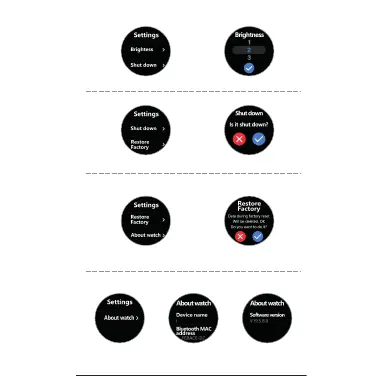
Pres s Abou t watch i con , Read wa tch nam e, Bl uetoo th MA C
addr ess a nd Soft war e versi on
Pres s Fac tory mo de ic on, Sel ect tic k to re set you r wat ch in
Fcat ory M ode
Settin gs
Sed ent ary
mod e
Do not
dis tur b
Bri ght nes s
Shu t down
Lau age s
Res tor e
Fac tor y
Abo ut watch
Setting Manual
Fin d Phone
Set tings
Sto pwatc h
Settin g Sedantary Mode
Settin g Do Not Disturb Mode
Pres s sma ll Butt on to tur n on/ off Seda nta ry or Do No t Dis turb Mo de
Settin g Brightness Mode
Pres s Bri ghtne ss ic on, Sel ect the b rig htnes s of yo ur scre en
Pres s Wa tc h OFF i con, Se lec t tick to t urn o ff your wa tch
Shut Down
Restor e Factory
Restor e Factory
Helligkeitsmodus einstellen
Ausschalten
Werkseinstellungen wiederherstellen
Werkseinstellungen wiederherstellen
Drücken Sie auf das Symbol Uhr AUS, wählen Sie das Häkchen,
um Ihre Uhr auszuschalten.
Drücken Sie auf das Symbol Werksmodus. Wählen Sie das Häkchen,
um Ihre Uhr in den Werksmodus zurückzusetzen.
Drücken Sie auf das Symbol “Über die Uhr”, um den Namen der Uhr,
die Bluetooth-MAC-Adresse und die Softwareversion abzulesen.
Drücken Sie das Symbol Helligkeit und wählen Sie die Helligkeit Ihres Bildschirms



 To Next Page