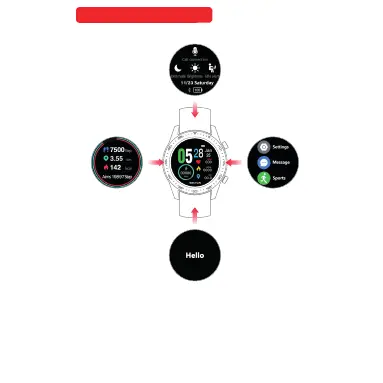
Quick Change Function
Watch face mode left move Sport Mode , Right move
Main Manual. Up Move Custom message, Down mo ve
Fast change Function mode.
con nect
PHONE CONNECT:
Press grey Microphone icon, tu rn on mo bile B luet ooth s earc hing
“ WATCH BRY03 Call” press to connect. The Micr opho ne ico n will
turn white color. The watch Connected.
BRIGHTNESS :
Press SUN icon brightness control had 3 leve l. Sel ect 1, 2 or 3 for
you choose.
NO DISTURBANCE :
Press the moon icon,Trun on is white colou r, Trun off i s grey
colour
LONG SIT REMIND:
Press the SITTING icon,Trun on is white colour, Trun off is grey
colour
Quick Change Function
One touch on
Call connection
One touch off
Call connection
Phon e BL E
Blu etoot h
S02 CA LL
Fonction de changement rapide
Mode face de la montre Déplacement vers la gauche Mode sport Déplacement vers
la droite Menu principal Déplacement vers le haut Message personnalisé Déplacem-
ent vers le bas Changement rapide Mode de fonction



 To Next Page