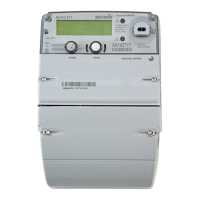
This document provides instructions for obtaining meter readings from a Secure Handset and directly from Secure electricity and gas meters.
Secure Handset Description
The Secure Handset is a device designed to display electricity and gas meter readings, offering a convenient way for users to monitor their energy consumption. It features a monochrome display with a user-friendly interface, allowing navigation through various menus to access historical data and settings.
Function Description:
The primary function of the Secure Handset is to retrieve and display meter readings for both electricity and gas. It acts as a remote interface to the smart meters, providing real-time and historical consumption data. Users can switch between electricity and gas readings, view daily, weekly, or monthly consumption, and access other settings related to their energy usage.
Usage Features:
- Main Menu Navigation: The handset displays a main menu with options such as "Message," "History," "Tariff," "Account," and "Settings." To access meter readings, the user needs to press the "History" button.
- Switching Between Fuels: If the user has dual fuel meters (electricity and gas), the handset allows switching between "Electricity" and "Gas" readings. This is achieved by pressing a dedicated button, typically labeled "Electricity" or "Gas," which toggles the display between the two fuel types.
- Viewing Historical Data: Once in the "History" screen, the handset initially displays readings for the current "Hour." To view cumulative readings for a longer period, such as a month, the user needs to press the top right-hand button repeatedly until "Month" is displayed. This changes the "Period Total" to show the cumulative consumption for the selected period (e.g., "Cuml: XXXXX" for monthly cumulative).
- Display Elements: The display shows the current time (e.g., "15:38"), date (e.g., "23.11.14"), and various data points such as "Period Total" (e.g., "75.4 kWh" or "Cuml: XXXXX kWh"). It also includes a graphical representation of consumption over a period (e.g., "M T W T F S S M" for days of the week).
- Target Feature: The handset includes a "Target" feature, although its specific functionality is not detailed in the provided document. It likely allows users to set consumption targets and track their progress.
Technical Specifications (Inferred from images):
- Display: Monochrome LCD.
- Navigation: Button-based interface.
- Connectivity: Wirelessly communicates with smart meters (implied by "Handset" functionality).
- Power Source: Not specified, but typically battery-powered for portability.
Maintenance Features:
The document does not explicitly detail maintenance features for the handset. However, general maintenance would likely involve:
- Keeping the device clean and dry.
- Replacing batteries when indicated (if battery-powered).
- Ensuring the device is within range of the smart meters for proper communication.
Secure Electricity Meter Description
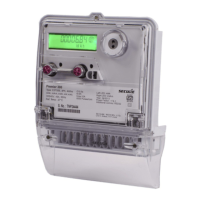
The Secure Electricity Meter is a smart meter designed to measure and record electricity consumption. It features a digital display and a keypad for direct interaction.
Function Description:
The primary function of the Secure Electricity Meter is to accurately measure and record electricity usage in kilowatt-hours (kWh). As a smart meter, it is capable of two-way communication, allowing for remote meter readings and potentially other smart grid functionalities. It also provides a direct interface for users to view their current meter reading.
Important Technical Specifications:
- Model: Secure Liberty 100 (Type Code MAX10Y).
- Type: 1P. 2W, 230V, CIB 50Hz (Single Phase, 2 Wire, 230 Volts, 50 Hertz).
- Current Range: 05-10(100)A (Base current 5A, maximum current 100A).
- Temperature Range: -25°C to 55°C.
- Constant: 3200 Imp/kWh (3200 impulses per kilowatt-hour, indicating the meter's pulse output for energy measurement).
- Standards: EN50470-1, EN50470-3, UK 0120/SGS0100.
- Accuracy Class: CE M12 0120 (Class B accuracy, certified in 2012).
- Serial Number (Sr. No.): S0000358, XA133448.
- MAC ID: 88797E0000001FAA.
- IMEI No.: 359193032809709.
- Year of Manufacture: 2013.
- Property of: Secure Meters (UK) Ltd.
- Connectivity: WAN (Wide Area Network) and HAN (Home Area Network) capabilities, indicated by "WAN HAN" symbols.
Usage Features:
- Direct Meter Reading: The meter has a digital display that shows the meter reading (e.g., "XXXXX").
- Keypad Interaction: A keypad with numerical buttons (0-9) and function buttons (A, B) is present. To view the meter reading, the user needs to press the "9" button once.
- Status Indicators: LEDs or symbols for WAN and HAN connectivity are visible, indicating the meter's communication status.
Maintenance Features:
- The meter is designed for long-term, low-maintenance operation once installed.
- It is sealed (indicated by "Property of Secure Meters (UK) Ltd."), implying that internal components are not user-serviceable.
- Regular maintenance would typically involve remote monitoring and occasional on-site checks by utility providers.
Secure Gas Meter Description
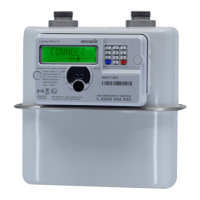
The Secure Gas Meter is a smart meter designed to measure and record gas consumption. Similar to the electricity meter, it features a digital display and a keypad for direct user interaction.
Function Description:
The primary function of the Secure Gas Meter is to accurately measure and record gas usage, typically in cubic meters (m³). As a smart meter, it facilitates remote meter readings and integrates into a smart energy system. It also provides a direct interface for users to view their current gas meter reading.
Important Technical Specifications:
- Model: Liberty EG4v 10.
- Type Code: G01163.
- Maximum Flow Rate (Qmax): 6 m³/h.
- Minimum Flow Rate (Qmin): 0.04 m³/h.
- Maximum Pressure (Pmax): 0.2 bar.
- Temperature Range: -10°C to +55°C.
- Standards: BS EN 16314-2011, BS EN 1350 1999/A1.
- Accuracy Class: CE M12 (Certified in 2012).
- Explosion Protection: Ex nAll T6 Ex (Indicates suitability for use in potentially explosive atmospheres, specifically Zone 2, with a temperature class T6).
- Serial Number (Sr. No.): XA132273.
- MAC ID: 88797E0000001FD2.
- Year of Manufacture: 2013.
- Property of: Secure Meters (UK) Ltd.
Usage Features:
- Direct Meter Reading: The meter has a digital display that shows the meter reading (e.g., "XXXXX").
- Keypad Interaction: A keypad with numerical buttons is present. To view the meter reading, the user needs to press the "9" button once.
Maintenance Features:
- Like the electricity meter, the gas meter is designed for long-term, low-maintenance operation.
- It is a sealed unit, indicating that internal components are not user-serviceable.
- Its explosion protection rating (Ex nAll T6 Ex) implies specific safety considerations during installation and any potential servicing, which must be performed by qualified personnel.
- Regular maintenance would typically involve remote monitoring and occasional on-site checks by utility providers.
In summary, the Secure Handset provides a user-friendly interface for accessing energy consumption data from both electricity and gas smart meters. The meters themselves are robust, certified devices designed for accurate measurement and smart grid integration, offering direct reading capabilities for users.

 Need help?
 General

 To Next Page