5
4. Baud Rate Setting
Baud Rates: 2400/S, 4800/s, 9600/s The #7 & #8 positions of switch S1 on the
PCB are used for setting the baud rate. The default setting is 9600/S. This setting
must match the setting in your DVR or controller device.
Table for Baud Rate Setting
Baud Rate
Switch Positions
7 8
2400/S ON ON
4800/S OFF ON
9600/S ON OFF
9600/S OFF OFF
5. ID Setting
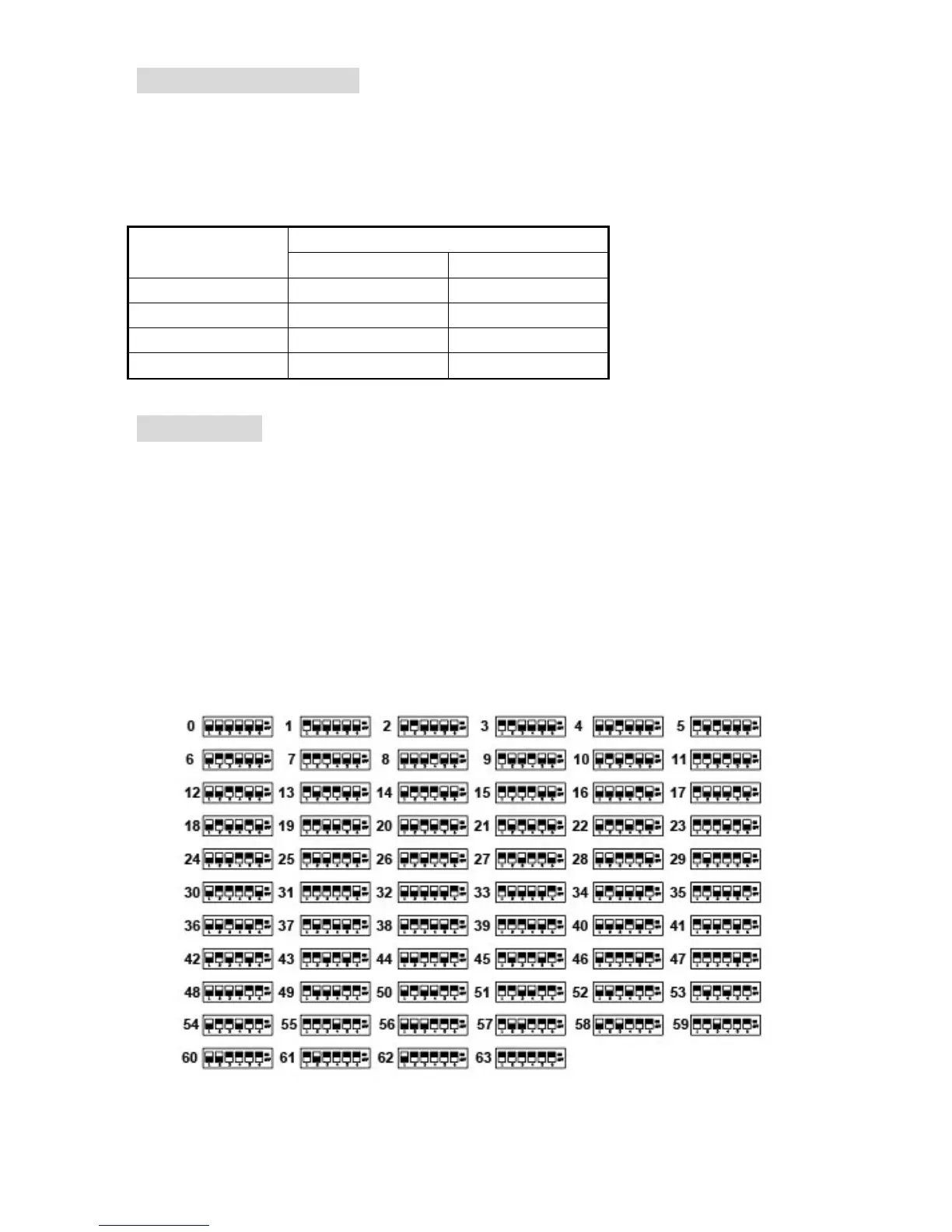
The #1~#6 positions of switch S1 on the PCB are used for setting the ID of your PTZ
camera. The default value is OFF. An ID number is needed for your DVR or controller
to contact the proper camera you are wanting to operate.
Note: The ID number can be plus or minus 1 or 2 according to different types of control
systems. Pelco-P particularly may need for the controlling device (DVR) to have a camera ID
number set to 1 or 2, to control a camera that has its control board set to number 1.
Please disconnect and re-apply power (re-boot) to the dome after setting the ID switches.
Table for ID switch setting (up is “ON”). Selection switch positions
of 1 through 6 (of 8 total) on S1 are shown below:



 To Next Page