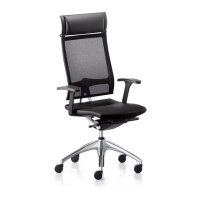
A Height of the seat
® Lowering the seat:
1. Sit down on the seat 2. Pull the lever upwards
(the seat will drop slowly)
3. Releasing the lever at the desired height
will lock the position
® Raising the seat:
1. Stand up 2. Pull the lever upwards (the seat will rise
slowly)
3. Releasing the lever at the desired height will lock the position
B Height of lumbar support
®
1. Disengage backrest 2. Adjust lumbar support/on fully upholstered
model turn both levers up or down simultaneously
D Angle of the backrest
® Adjusting the backrest dynamically:
1. Pull the lever upwards and
release it
2. Lean against the backrest 3. The backrest is free-floating
® Locking the backrest into position:
1. Lean back until the backrest
reaches the desired angle
2. Press the lever down and release it to
lock the backrest into position
® Release the backrest lock when the chair is not in use
C Depth of lumbar support on mesh and slim versions (optional)
®
1. Disengage backrest 2. Turn inlay to increase or decrease support


 To Next Page