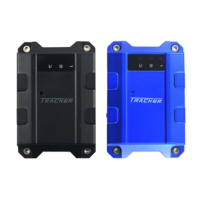
The SEEWORLD P1 4G PET GPS TRACKER is a global dynamic IoT location service provider, designed to be a high-quality life partner for pet owners. It combines passion and innovation to offer accurate and safe location and navigation services, enabling users to track anything, anywhere, anytime, and contribute to a smarter world and life.
Function Description:
The P1 4G PET GPS TRACKER offers a comprehensive suite of features for pet tracking and safety. Its core function is Location Tracking, utilizing a multi-positioning system including BDS, GPS, LBS, and AGPS to ensure precise location data. This allows pet owners to monitor their pet's whereabouts in real-time. The device supports 4G network communication, ensuring reliable and fast data transmission for tracking information.
For historical tracking, the device provides Track Playback, allowing users to review their pet's past routes and activities. To enhance safety, the P1 tracker includes Geo-fencing alarm capabilities, enabling users to set virtual boundaries and receive alerts if their pet enters or exits these predefined areas. In situations where the device loses network connectivity, it features Blind spot supplementary transmission, which stores location data and uploads it once connectivity is restored, minimizing data loss.
The device also incorporates features specifically designed for pet interaction and recovery. It has Lighting for pets, which can be activated to help locate pets in low-light conditions. Additionally, a Sound pet search function allows the device to emit a sound, aiding in finding a lost pet nearby.
Maintenance and updates are streamlined with OTA remote upgrade functionality, allowing the device's firmware to be updated wirelessly. A Power-off alarm provides an alert if the device is turned off, which could indicate tampering or a low battery. The device is equipped with a Large capacity rechargeable battery, ensuring extended operational time.
Important Technical Specifications:
- Operating Voltage: 3.7V
- Position Method: GPS+BDS+LBS+AGPS
- Positioning Error: <10 M
- Communications Network: 2G/4G
- Communication Frequency Band:
- Global Edition LTE-FDD: B1/B2/B3/B4/B5/B7/B8/B12/B13/B18/B19/B20/B25/B26/B28/B66
- LTE-TDD: B34/B38/B39/B40/B41
- GSM: 850/900/1800/1900MHz
- Communication Mode: TCP
- Range of Working Temperature: -20°C ~ +75°C
- Working Humidity: 10%-85% RH
- Specifications Size: L75.8mmW37.6mmH19mm
- Weight: 42g
- Built-in Battery Capacity: 700mAh
- Standby Time: *4 days (Note: Power consumption is related to daily pet exercise. Battery life is calculated based on walking the dog for 2-3 kilometers per day. Power consumption accelerates in poor signal conditions.)
- Warranty Period: 1 year
Usage Features:
The P1 tracker is designed for ease of use, from installation to daily operation.
- Easy to install: The device features a collar fixing silicone buckle, making it simple to attach to a pet's collar.
- Device Appearance: It includes an on-off key, indicator light, buzzer, magnetic charging port, and a SIM card installation port.
- APP Integration: The device operates in conjunction with a dedicated mobile application called "Here - Connect What We Care," available on App Store and Google Play.
- Device Activation:
- Download the APP: Search for "Here - Connect What We Care" and download the application.
- Turn on the device: Press and hold the on-off button for three seconds until the indicator light illuminates, signaling normal startup. Ensure the device is charged if it doesn't power on.
- Register and log in: Create an account and log in to the application.
- Add device: Enter the Amazon order number and the 15-digit IMEI number (found on the device) for binding. The app also supports scanning a QR code for binding.
- Choose a plan: Select a subscription plan (e.g., 1 month, 3 months, 6 months, 12 months) and complete the payment.
- LED Status Indicators: The device uses LED lights to communicate its status:
- Blue LED:
- Slow flash: Searching for satellite signals.
- Always on: GPS/BDS has been located.
- Not bright: GPS/BDS sleep.
- Yellow LED:
- Slow flash: Communication network initialization.
- Always on: Network communication is normal.
- Not bright: Network Sleep/Shutdown.
- Red LED:
- Always on: Connected to power/charging.
- Not bright: (To be filled - likely indicates no power/charging).
- White LED:
- Slow flash: Looking for pets (pet search function active).
- Not bright: The pet search function is not turned on.
Maintenance Features:
The device is designed for reliability, but troubleshooting steps are provided for common issues.
- Troubleshooting Poor Signal Reception: If the device experiences poor signal reception (e.g., near tall buildings or in basements), the solution is to move the terminal to a location with good signal.
- Troubleshooting Unable to Connect to the Network:
- If the SIM card is not installed, check the SIM card.
- If there is dirt on the metal surface of the SIM card, wipe it with a clean cloth.
- If it's an invalid SIM card, contact your Internet Service Provider.
- If out of GSM service area or experiencing weak signal, move to an ISP service area or a strong signal area and try again.
- Troubleshooting Shutdown:
- If the device is not switched on, turn on the device battery switch.
- If the SIM is not installed properly, install the SIM card properly.
- If there's poor contact, check that the plug is properly connected.
- Battery Life Management: Users should be aware that battery consumption is influenced by pet activity and signal conditions. In cases of particularly poor signal, power consumption will accelerate. For any issues or concerns, customers are advised to contact customer service for consultation and resolution.
- After-Sales Support: For any after-sales inquiries, users can contact SEEWORLD via email at here@seeworld.com.



 To Next Page
 General