EasyManua.ls Logo

Seeworld S6 - User Manual

Seeworld S6
14 pages
Print Icon
To Next Page IconTo Next Page
Loading...
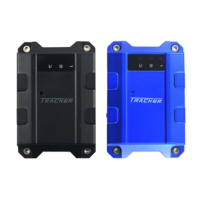
GPS Tracker Model-S6
User Manual
Version 1.0

Questions and Answers

Summary

Device Specifications

GPS Features

Details chipsets, sensitivity, and TTFF for GPS functionality.

GSM Features

Specifies GSM bands and maximum transmission power for cellular connectivity.

Device Outlook and Interfaces

SOS Button Operation

Explains how to activate the SOS alarm by pressing the button for 3 seconds.

LED Indicators

Battery and Charging Status

Details LED status for battery level and charging when connected/not connected.

GSM Signal Status

Explains LED signals for GSM network connection strength.

GPS Signal Status

Describes LED indicators for GPS signal acquisition status.

Installation and Setup

SIM Card and Battery Installation

Step-by-step guide for inserting the SIM card and battery.

SIM Card Usage Requirements

Advises using GSM SIM cards with GPRS/SMS enabled.

SIM Card Removal Warning

Warns to remove the battery before the SIM card.

Charging the Tracker

Details the process and duration for charging the device.

Charger Safety

Specifies ventilation and temperature requirements for charger use.

Tracker Placement

Describes the tracker's magnetic installation method and vehicle placement.

Recommended Placement

Suggests optimal placement locations for signal reception and performance.

Device Operation

SMS Command Operations

Explains how to control the tracker using SMS commands.

Tracker Information and Web Tracking

Important Notes and Troubleshooting

Seeworld S6 Specifications

General IconGeneral
BrandSeeworld
ModelS6
CategoryGPS
LanguageEnglish

Related product manuals