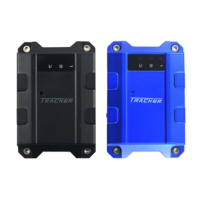
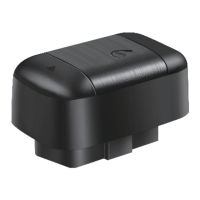
Need help?
Do you have a question about the Seeworld S116 and is the answer not in the manual?
Standard battery cables included with the device.
Standard screws and covers for mounting the device.
Standard fixing line for securing the device.
Optional relay accessory for specific functions.
Specifies GSM frequency bands (850/900/1800/1900MHz) and GPRS class (Class12, UDP).
Details the device's operating voltage (9-24V DC) and current consumption.
Information on GPS cold, warm, and hot start times, and positioning accuracy.
Specifies working temperature, humidity, and device measurements.
Explains the function of the red LED for power and working status.
Describes the green LED indicating GPS signal reception status.
Details the blue LED for GSM signal and GPRS data status.
Steps for checking the product and preparing for SIM card installation.
Recommendations for professional installation and optimal placement of the tracker.
Details the DC 9-24V power supply, polarity, and grounding requirements.
Refers to the practice of installing the device discreetly.
Describes the LED indicators upon power on and the procedure for powering off the device.
Instructions for setting, deleting, and checking admin and authorized phone numbers.
Commands for managing authorized numbers, including adding, deleting, and checking.
How to query the list of authorized phone numbers.
Procedures for changing the device password and initializing it to default.
Methods to get the device's location via SMS commands.
Instructions for setting the device's time zone and checking IP/port.
How to configure the data upload interval for static and moving states.
Command to set the data upload frequency when the device is in motion.
Command to disable continuous GPS data reporting.
Commands to remotely stop or restore the vehicle's oil supply based on speed.
Instructions for setting up an alarm when the vehicle exceeds a predefined speed.
Command to disable the over-speed alarm function.
How to configure vibration sensitivity and disable the vibration alarm.
Command to reset the device's SIM card and system.
Methods to obtain the device's location information via SMS.
Troubleshooting steps for the device being offline or unreachable on the web platform.
Guidance on ensuring proper GPS signal reception, avoiding obstructions.
Troubleshooting steps for issues related to receiving GSM signals.
Steps to diagnose why the red LED is not lit when the device is powered on.
Important notices regarding product changes, appearance, and warranty terms.
Table for recording warranty details like name, IMEI, and invoice number.
Fields for recording sales unit information and warranty period.
List of situations not covered by the warranty, requiring maintenance costs.
Template for the first maintenance record entry.
Template for the second maintenance record entry.


 To Next Page
 General