EasyManua.ls Logo

Sega CD - Using the Control Pad

Sega CD
32 pages
Print Icon
To Next Page IconTo Next Page
To Previous Page IconTo Previous Page
Loading...
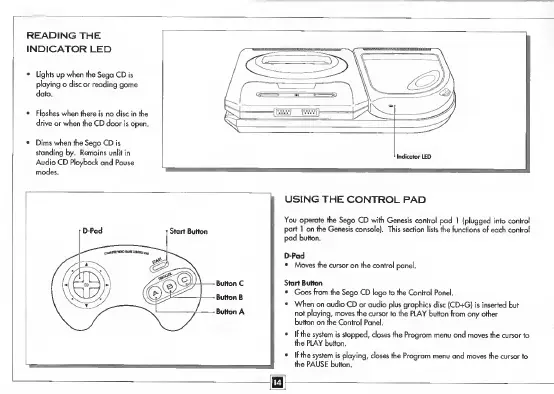
READING
THE
INDICATOR
LED
Lights
up
when
the
Sega
CD
playing
a
disc
or
reading
gai
USING
THE
CONTROL
PAD
You
operate
the
Sega
CD
with
Genesis
control
pad
1
(plugged
into
control
port
1
on
the
Genesis
console).
This
section
lists
the
functions
of
each
control
pad
button.
D-Pad
Moves
the
cursor
on
the
control
panel.
Start
Button
Goes
from
the
Sega
CD
logo
to
the
Control
Panel.
When
an
audio
CD
or
audio
plus
graphics
disc
(CD+G)
is
inserted
but
not
playing,
moves
the
cursor
to
the
PLAY
button
from
any
other
button
on
the
Control
Panel.
If
the
system
is
stopped,
closes
the
Program
menu
and
moves
the
cursor
to
the
PLAY
button.
If
the
system
is
playing,
closes
the
Program
menu
and
moves
the
cursor
to
the
PAUSE
button.

Related product manuals