EasyManua.ls Logo

Sega CD - Connecting Stereo Sound: Original Genesis

Sega CD
32 pages
Print Icon
To Next Page IconTo Next Page
To Previous Page IconTo Previous Page
Loading...
TO
CONNECT
STEREO
SOUND:
ORIGINAL
GENESIS
MODEL
Attaching
the
Sega
CD
to
a
stereo
system
will
dramatically
increase
the
sound
quality
of
audio
discs
and
Sega
CD
games.
It
will
also
enhance
the
sound
performance
of
Genesis
cartridge
games.
This
section
shows
you
how
to
add
stereo
sound
to
enrich
your
enjoyment
of
the
Sega
CD
system.
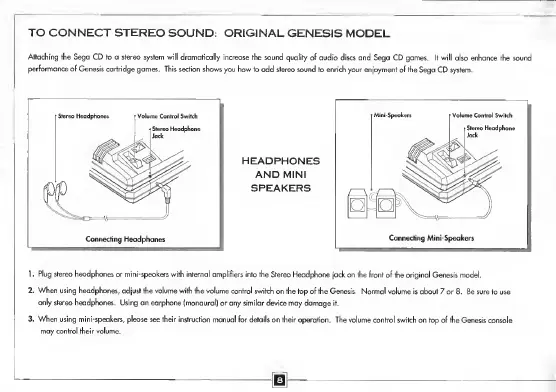
1.
Plug
stereo
headphones
or
mini-speakers
with
internal
amplifiers
into
the
Stereo
Headphone
jack
on
the
front
of
the
original
Genesis
model.
2.
When
using
headphones,
adjust
the
volume
with
the
volume
control
switch
on
the
top
of
the
Genesis.
Normal
volume
is
about
7
or
8.
Be
sure
to
use
only
stereo
headphones.
Using
an
earphone
(monaural)
or
any
similar
device
may
damage
it.
3.
When
using
mini-speakers,
please
see
their
instruction
manual
for
details
on
their
operation.
The
volume
control
switch
on
top
of
the
Genesis
console
may
control
their
volume.
m

Related product manuals