EasyManua.ls Logo

Sega CD - Page 31

Sega CD
32 pages
Print Icon
To Next Page IconTo Next Page
To Previous Page IconTo Previous Page
Loading...
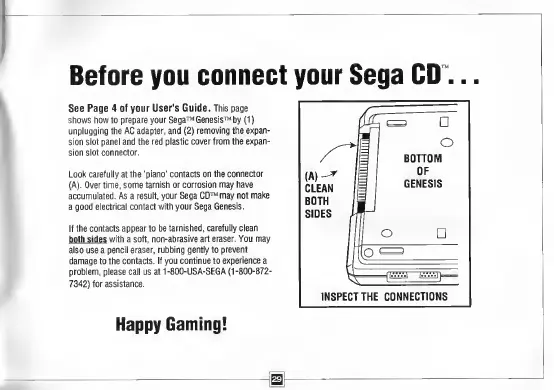
Before
you
connect
your
Sega
CD..
See
Page
4
of
your
User's
Guide.
This
page
shows
how
to
prepare
your
Sega
Genesis
by
(t)
unplugging
the
AC
adapter,
and
(2)
removing
the
expan¬
sion
slot
panel
and
the
red
plastic
cover
from
the
expan¬
sion
slot
connector.
Look
carefully
at
the
'piano'
contacts
on
the
connector
(A).
Over
time,
some
tarnish
or
corrosion
may
have
accumulated.
As
a
result,
your
Sega
CD
may
not
make
a
good
electrical
contact
with
your
Sega
Genesis.
If
the
contacts
appear
to
be
tarnished,
carefully
clean
both
sides
with
a
soft,
non-abrasive
art
eraser.
You
may
also
use
a
pencil
eraser,
rubbing
gently
to
prevent
damage
to
the
contacts.
If
you
continue
to
experience
a
problem,
please
call
us
at
1-800-USA-SEGA
(1
-800-872-
7342)
for
assistance.
S
Happy
Gaming!

Related product manuals