9
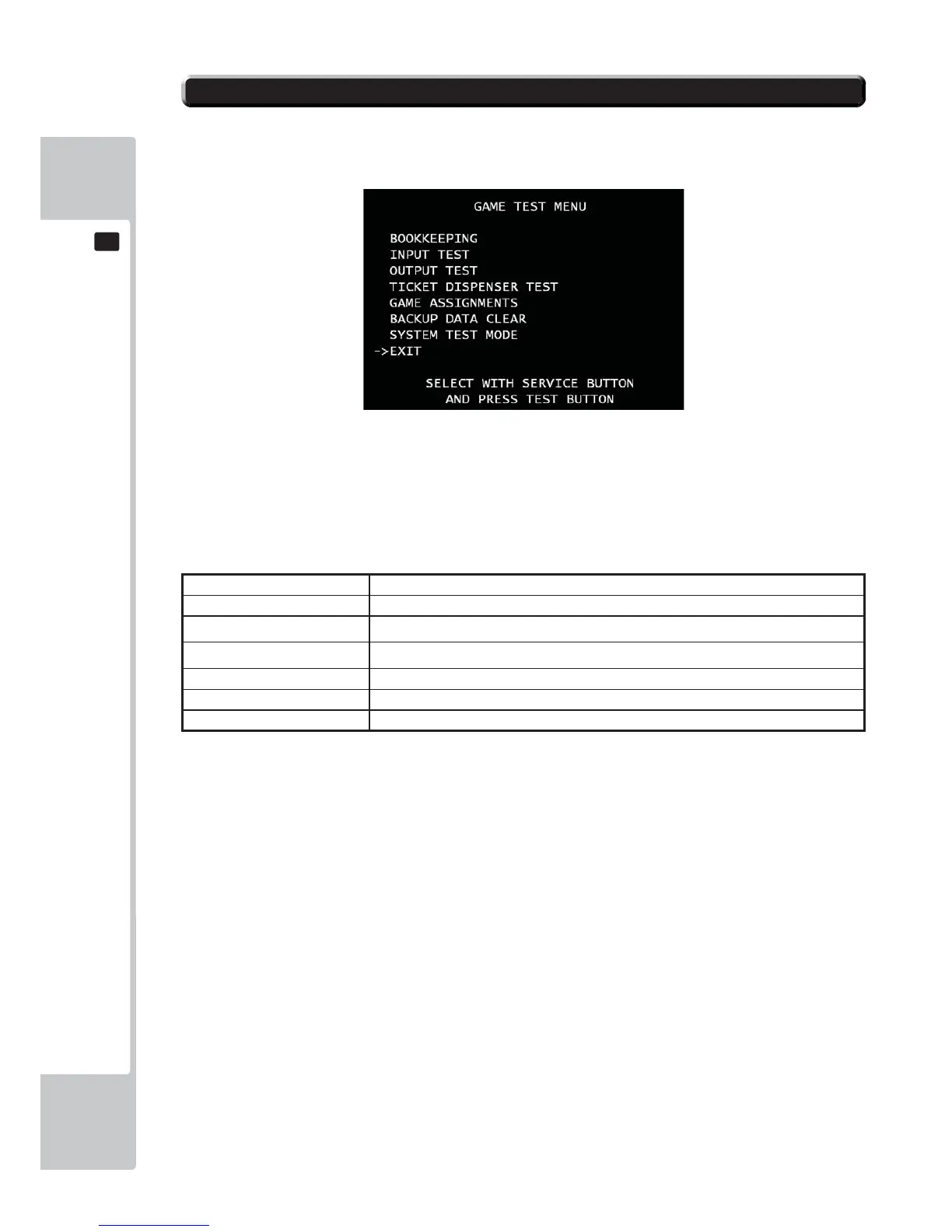
GAME TEST MENU
Press test button to enter GAME TEST MENU screen.
■Control
- Use the SERVICE Button to move the cursor to the desired test item.
- Press the TEST Button to confi rm selection of the item.
- Select EXIT and press the TEST Button to return to the SYSTEM TEST MODE screen.
■Menu Item
BOOKKEEPING Displays all recorded game data.
INPUT TEST Tests each input device used for the game.
OUTPUT TEST Tests each output device used for the game.
TICKET DISPENSER TEST Tests vending ticket machines.
GAME ASSIGNMENTS Adjusts all game settings
BACKUP DATA CLEAR Erases all types of game records.
SYSTEM TEST MODE Enter SYSTEM TEST MODE
9-11 GAME TEST MENU



 To Next Page