9
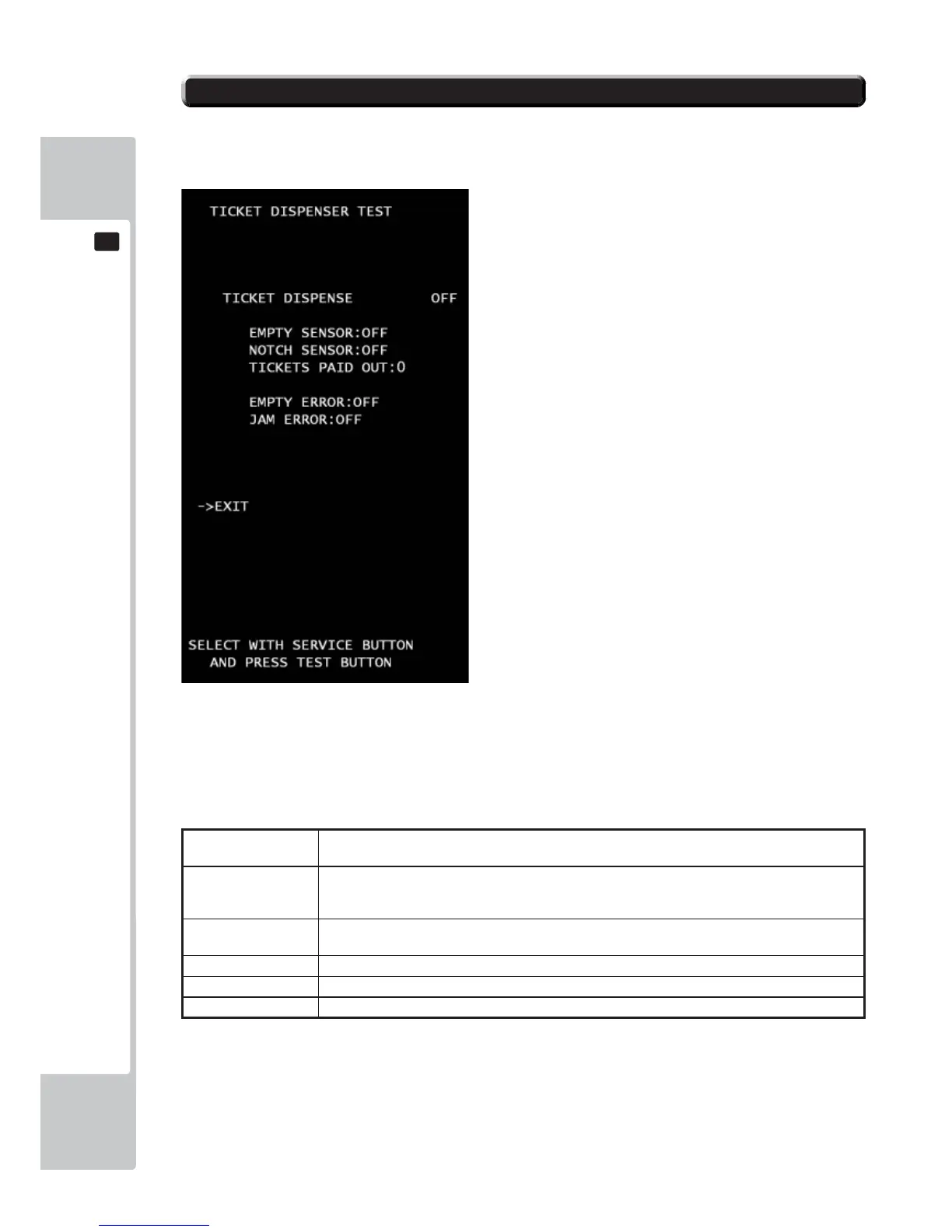
TICKET DISPENSER TEST
Test all the ticket vending devices utilized in game.
■Control
- Use the SERVICE Button to move the cursor to the desired test item.
- Press the TEST Button to confi rm selection of the item.
- Select EXIT and press the TEST Button to return to GAME TEST MODE screen.
■Menu Item
TICKET DISPENSE Press TEST button, this item will display “ON” and Ticket vending works. The test button is pressed
again, the item will display “OFF” and Ticket vending stops.
EMPTY SENSOR The status of ticket empty sensor. The item will display “OFF” of ticket box is enough to play to
vend tickets. If it’s not, the sensor will work and the item will display “ON”.
NOTCH SENSOR The status of notch sensor for the ticket. The item will display ”ON” when sensor fi nd the notch of
ticket.
TICKET PAID PUT Amount of tickets paid during this mode.
EMPTY ERROR The current status of ticket empty error. If the status is error, The item will display “ON”
JAM ERROR The current status of ticket jam error. If the status is error, The item will display “ON
If Error status is “ON”, please respond for each error, and then press Ticket
Release Switch to back normal.
9-15 TICKET TEST



 To Next Page