10
16. One Key Return
One Key Return allows your drone to return to its take-off coordinates with the push of a button. To activate, press
the One Key Return button and use the left control sick to adjust the altitude of your drone. Once your aircraft is
within visible and controllable range, push the directional lever in any direction to exit return mode.
17. Headless Mode
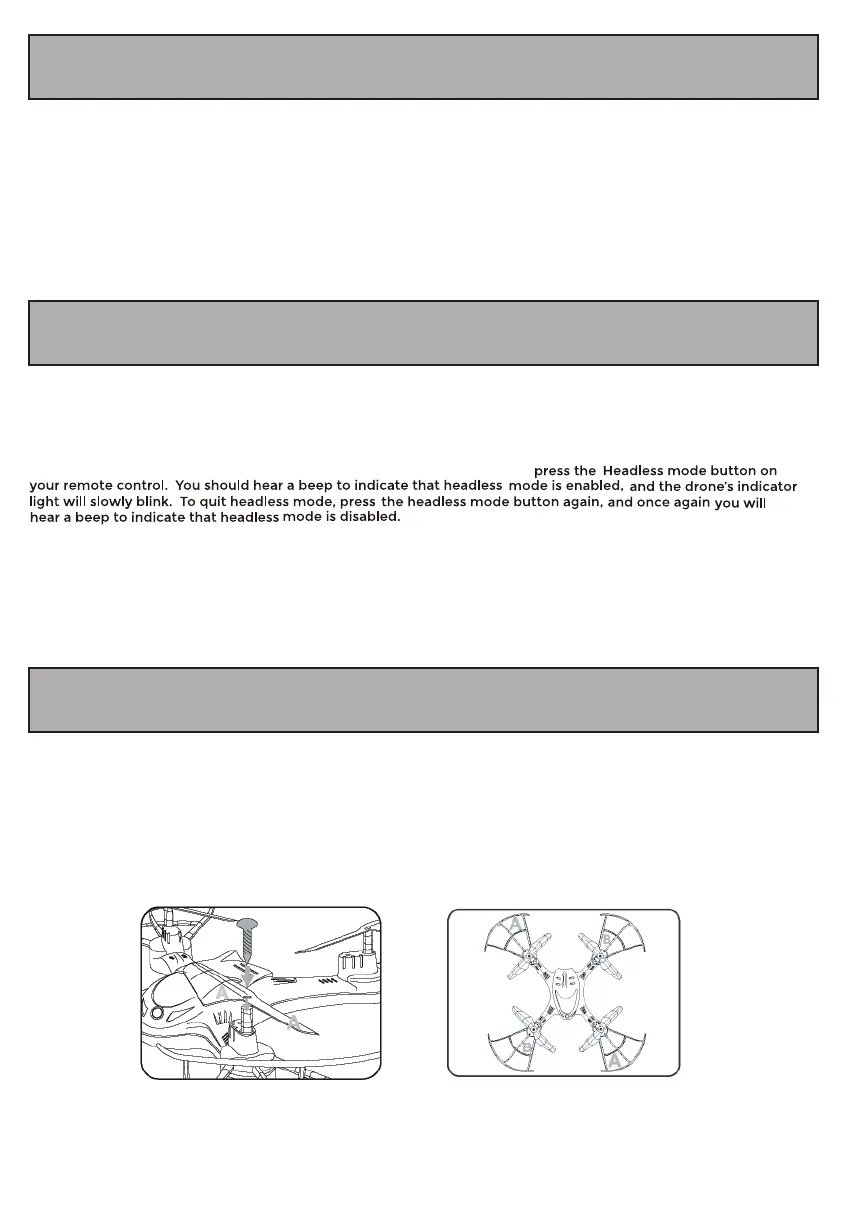
18. Propeller Blade Installation
If you need to replace the propeller blades (extras not included), use a screwdriver and twist counterclockwise to
remove the screw holding the propeller blade. Place the propeller blade in the correct blade position “A”/”B” that
corresponds with the illustrations below. Twist the screw down in a clockwise direction to secure the propeller
blades.
Headless mode allows you to fly your drone without worrying about the drone’s orientation. Regardless of which
way the drone is facing, this function ensures that the drone will always follow controls from your perspective all
the time.
To enter Headless mode, after your drone takes off, stand in front of your drone and press the Headless mode
button on your remote control. The lights on your drone will blink slowly.


 To Next Page