
 Need help?
Do you have a question about the Segway miniPro and is the answer not in the manual?
Clean the mainframe with a soft cloth; store in a cool, dry place to prevent aging.
Maintain battery in stated temperature limits; charge after each ride to prevent damage.
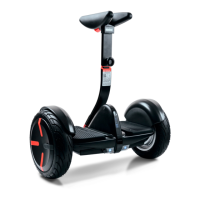
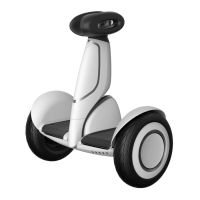
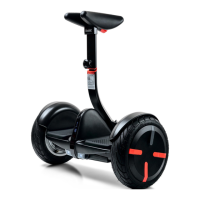
The Ninebot by Segway miniPRO is a revolutionary electric balancing vehicle designed for personal transportation, featuring integration with a mobile device application for enhanced control and user experience. It offers a unique blend of recreational riding and smart technology, making it suitable for navigating various terrains.
The miniPRO operates as a self-balancing electric vehicle, allowing riders to move by gently leaning their body forward, backward, or to the sides. Its core function is to provide an intuitive and engaging personal mobility solution. The device is equipped with a steering bar that the rider leans against with their knees to control direction, offering a hands-free riding experience. Powering the miniPRO is an electric motor and battery system, which provides propulsion and maintains balance. The vehicle is designed to be activated and managed through the Ninebot by Segway App, which is crucial for initial setup, safety tutorials, and accessing various features.
The miniPRO's usage is heavily reliant on its accompanying mobile application. Before the first ride, users must download the Ninebot by Segway App (available for iOS and Android devices) and complete a New Rider Tutorial. This tutorial is a critical safety measure, as the miniPRO's maximum speed is limited until the tutorial is completed. Initially, the speed is restricted to 4.3 mph (7 km/h), then to 6.2 mph (10 km/h) for the first 0.6 miles (1 km) after the tutorial, before allowing the user to disable the speed limiter and reach a maximum speed of 10 mph (16 km/h).
Riding the miniPRO involves stepping on from the back, placing one foot on the foot mat while keeping the other on the ground, and slowly transferring weight onto the device until it balances. Movement is controlled by gently leaning the body, and turning is achieved by leaning against the steering bar with the knees. The miniPRO is designed for use in large open areas initially, with assistance from a friend recommended for the first ride. Riders are advised to wear an approved helmet and other protective gear to minimize injury risks.
The device features a dashboard with icons indicating power status, lock mode, Bluetooth connection, speed limit, and power level. The power button turns the device on and off, and the miniPRO will automatically power off after 10 minutes of inactivity or if laid down for over 30 seconds. The lock mode, enabled via the App, causes the miniPRO to vibrate, flash its lights, and sound an alarm if moved, and it will not balance in this mode. The Bluetooth icon blinks when enabled but not connected, and glows steadily when connected to the App. The speed limit icon illuminates when the miniPRO is limited to 4.3 mph (7 km/h), with the device tilting back as the speed limit is approached. The power level icon indicates remaining battery life, blinking and beeping when nearly empty, and the miniPRO gradually reduces max speed when battery is below 30%.
The miniPRO also includes a Remote Control (R/C) Mode, accessible through the Ninebot by Segway App. In this mode, users can drive their miniPRO using a virtual joystick on their mobile device. The default maximum speed in R/C mode is 4.3 mph (7.0 km/h), which can be adjusted in the App. The Bluetooth range for R/C mode is 30-50 feet (10-15 meters), and the miniPRO will stop moving if the device goes out of range.
Another useful feature is the Lifting and Power Assist Mode. When the miniPRO is lifted off the ground in Balance Mode, motor power is cut off, and it resumes balancing when placed back down. For lifting, users should use the steering bar, avoiding the fenders or mainframe to prevent injury. The Power Assist Mode is engaged by pulling up the guide bar when the miniPRO is powered on but without a rider. This allows users to steer the miniPRO across smooth surfaces using the guide bar, making it easier to maneuver the device when not riding.
Safety warnings are integrated throughout the user experience. Riders are cautioned against riding on public roads, motorways, highways, or streets, and are advised to avoid sudden acceleration or deceleration. They should not ride through puddles, over obstacles like holes or curbs, or on slopes steeper than 15 degrees. The miniPRO is designed for a single rider, and carrying passengers or children is prohibited. Stunts are also strongly discouraged.
Maintaining the miniPRO involves several key aspects to ensure its longevity and safe operation. For cleaning, a soft, wet cloth can be used to wipe the mainframe. Stubborn dirt can be scrubbed with a toothbrush and toothpaste, then wiped clean. Scratches on plastic parts can be polished with extra fine grit abrasive paper. Users are warned against using alcohol, gasoline, acetone, or other corrosive/volatile solvents, as these can damage the device's appearance and internal structure. High-pressure washing is also prohibited. Before cleaning, it is crucial to ensure the miniPRO is powered OFF, the charging cable is unplugged, and the rubber cap on the charge port is tightly sealed to prevent electric shock or damage to electronic components.
Storage of the miniPRO should be in a cool, dry place, away from direct sunlight and extreme temperatures (both hot and cold), as these conditions can accelerate the aging process of plastic components and reduce battery life.
Battery pack maintenance is critical. The battery should not be stored or charged at temperatures outside the specified limits. After each ride, the battery should be charged, and complete draining should be avoided, as this can cause permanent damage and void the Limited Warranty. A fully charged battery typically retains charge for 120-180 days in Standby Mode, while a low-power battery retains charge for 30-60 days. The battery performs best at room temperature (70°F [22°C]), with performance and range decreasing significantly in colder temperatures (e.g., half the range at -4°F [-20°C]). The battery range recovers as the temperature rises. Users are warned against disassembling the battery due to the risk of fire and the absence of user-serviceable parts. Riding in ambient temperatures below 23°F (-5°C) is also discouraged, as low temperatures limit maximum power/torque, potentially leading to slips or falls.
Tire pressure is another maintenance point; tires should be inflated equally to 45-50 psi. Before each ride, users should check for loose fasteners, damaged components, and low tire pressure. If the miniPRO makes abnormal sounds or signals an alarm, riding should cease immediately, and the device should be diagnosed via the Ninebot by Segway App, with service sought from a dealer/distributor if necessary. Only Ninebot by Segway approved parts and accessories should be used, and modifications to the miniPRO are strongly discouraged as they can interfere with operation, cause serious injury or damage, and void the Limited Warranty.
 General
| Max Speed | 10 mph (16 km/h) |
|---|---|
| Weight | 28 lbs (12.7 kg) |
| Max Load | 220 lbs (100 kg) |
| Battery | 310 Wh |
| Charging Time | 4 hours |
| Tire Size | 10.5 inches |
| Water Resistance | IP54 |
| Motor Power | 800W (400W per motor) |





 To Next Page