11
Connecting the SLP to Your Computer
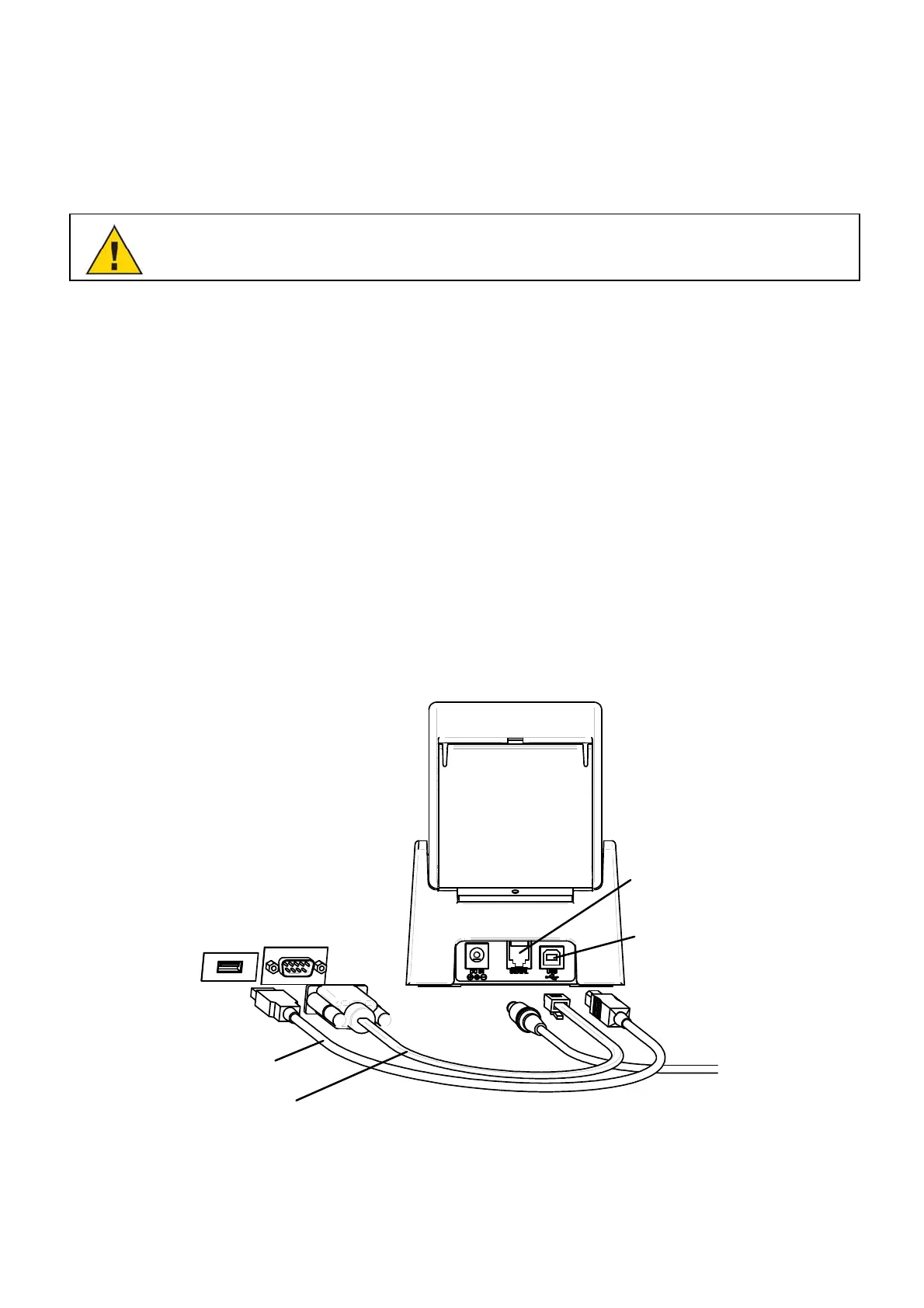
Use the USB or serial cable provided with the SLP 620, 650, or 650SE to connect the SLP to your
computer.
CAUTION: Connecting or disconnecting the interface cable while the printer is turned on may
damage the printer.
Follow these steps:
1. Make sure that the SLP is turned off. If the Status Light is on, hold the Power Button until the SLP is
turned off.
2. Connect the printer to your PC or Mac.
When using the USB cable:
Insert the USB cable into the USB port on your PC or Mac.
If all USB ports are in use, you may need to purchase a USB hub.
Connect the other end of the cable into the appropriate port on the back of the SLP.
When using the serial cable:
Insert the serial cable into the serial port on your PC or Mac.
Connect the other end of the cable into the appropriate port on the back of the SLP.
Computer
USB port
Computer
Serial port
SLP Serial port
SLP USB port
Serial cable
USB cable
or
Do not use both cables.


 To Next Page