Engs1
8
'
-
9
STOPWATCH
*The stopwatch 1/10 second and
1/100 second
hands move for 3 minutes
The stopwatch
can measure up to 12 hours in
1/199 second increments ‘ after
the measurement is started or
restarted and after
the split time is
After 12
hours,
it will
start
counting
again
from
"0"
and automatically
'e|ea$ed-
Themae" thel’ St'3V at
“O” Position Whne the smpwatch
is
stops
counting
when the measurement
reaches
24 hours_
counting.
When the measurement
is stopped or split time
is measured,
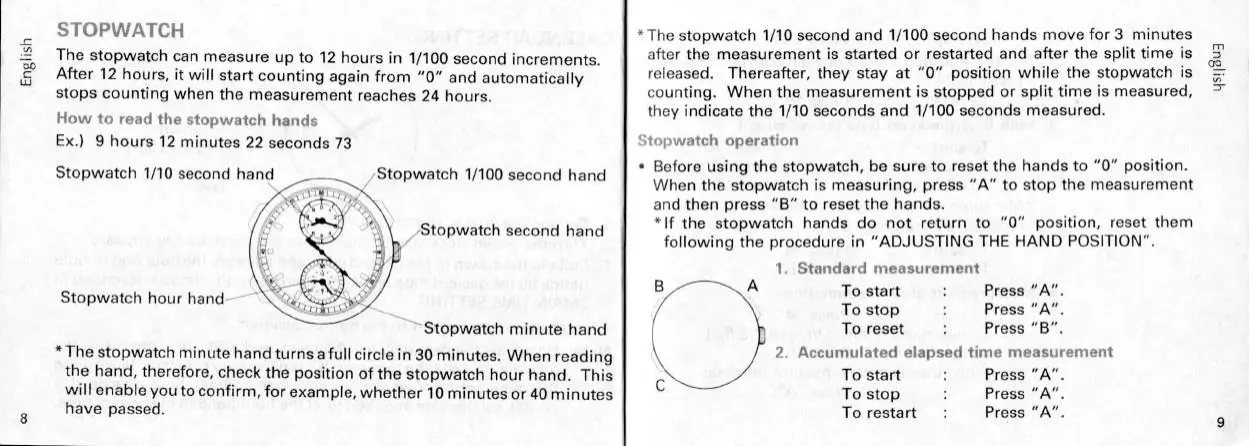
How to read the Stopwatch hands
they indicate the
1/10 seconds and 1/100 seconds
measured.
Ex.)
9 hours
12 minutes
22 seconds
73
‘V">1>Wat¢h
Operao
~ Before
using the stopwatch, be sure
to reset the hands
to "0" position.
Stopwatch
1/10 d
h
d
/St t
h
1
100
sewn
an l,\.‘.—§.;,7 i Opwa C /
Second hand When the stopwatch
is measuring, press "A"
to stop the measurement
§"*’§';’~“";;_
and then
press "B" to reset the hands.
5*‘
/St t h
d
h *lf the stopwatch hands do not return
to "0" position,
reset them
” / opwa
C Sew“ and following the procedure in
"ADJUSTING THE HAND
POSlTlON”.
ll
“.3
1. Standard measurement
g./ihgeol
C/
B A
Stopwatch hour
hand
"
“‘?<¢§)gIj!;U¢;>*/
- H//in:
\Stopwatch
minute
hand
To reset
: Press
*The
stopwatch
minute
hand turns
a full
circle
in
30 minutes.
When
reading
2‘ A°¢l1""1|a"ed
elapsed
time measufemeni
the hand,
therefore,
check the position
of the
stopwatch
hour hand.
This
C
To start : Press
"A".
will
enable
you
to conf|rm,for
example,
whether
10 minutes
or 40 minutes To stop
Press
have passed
To restart
' Press
Ha
us_8


 To Next Page