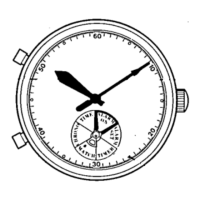
Modelwithouta24-hourhand
①
Pull out the crown to
second click when the
secondhandisatthe12
o'clockposition since the
second hand will be
stoppingonthespot.
(Formodelswithscrewlocktype
crown, unscrew the crown by
turning it counterclockwise, and
thenpullitouttosecondclick.)
②
Turnthecrowntosetthehourandminutehandstothedesired
time.Thedatemaybealteredhere,howeveritcanbeadjusted
separatelylater.Referto"Datesetting"fordetails.
When setting the hour hand, make sure that AM/PM is set
correctly(Thedatechangesonceevery24hours.)IfAM/PMis
set in error, the date will change at 12:00' noon to show the
wrongdateasaresult.
*Themomentthedatechangesitismidnight.
*Themechanismofquartzwatchesisdifferentfromthatofmechanicalones.To
setthetimeaccurately,advanceit4to5minutesaheadofthedesiredtimeand
thenturnitbacktotheexacttime.
*Thetelephonetimesignalservice(117)ishelpfulinsettingtheexacttime.
6
6
6
6
⑦.Pushthecrownbackinuponcompletionoftimesetting.Formodels
withscrewlocktypecrown,screwitincompletelybyturningit
clockwisewhilepressingit.
Thetimesettingforthistypeiscompleted.
Youcanconvenientlycheckthetimeofaspecifictimezoneareawiththe24-hourhandatany
timewhiledisplayingthecurrenttimeofyourareawiththehourandminutehands.
Whenreadjustingthetimeindicatedbythe24-hourhand,repeatthestepsforthistypestarting
fromStep1.For varioustime zonesof theworld, pleaserefer to"Time differencestable" for
details.



 To Next Page