20
SHUTDOWN - ANTI-FREEZE FUNCTION
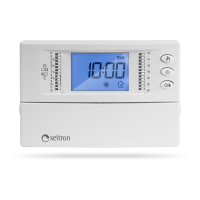
To switch off the timer thermostat press ‘ ’.
The display will show the word ‘OFF’ and the ‘ ’ symbol.
If the timer thermostat was set in the heating mode, the antifreeze
function will be enabled and the ‘ ‘ symbol will appear on the
display; in such a case the room temperature will be controlled
according to the programmed antifreeze temperature set point.
MANUAL OPERATION
Pressing the ‘ ‘ button will cause the ‘ ‘ symbol to appear
on the display and the timer thermostat will control the room
temperature according to the current comfort mode setting selected
by means of knob ‘ ‘, 24 hours a day, irrespective of the position
of the dipswitches.
To revert to operation according to the set daily program, press
‘ ‘ again.
TEMPERATURE / TIME DISPLAY
By repeatedly pressing the key ‘ ‘ the display cycles on showing
the current time, the room temperature measured by the internal
sensor, explained with the icon ‘ ‘, and the room temperature
measured by the remote sensor (if wired) explained with the icon
‘ ‘.
The values of temperature displayed are shown adjusted with the
set Offset value.
In case the parameter ‘ rEG ‘ is set on ‘ EHt ‘ but the remote
sensor is not wired or is broken the display will show the words
‘ SEnS OPEN ‘ or ‘ SEnS SHrt ‘ with the icon ‘ ‘ turned on.
When an electro-thermal actuator is wired to the output, this
parameter must be set with the actuator’s travel time, otherwise
‘on’ pulses of a lower time respect to the travel time would generate
unuseful output actions.
The parameter can be set in the range 3 .. 15 minutes.
The device leaves the factory with parameter set on 3 minutes.
‘dFLt’ SET DEFAULT DATA
With this parameterit ispossible to resetuser parametersin order
tobring back all theparameters to thefactory defaults.
Proceed as follows:
1. Select the parameter ’dFLt’ and press ’OK’; the device
automatically sets the default data and the display will show
‘ -dF- ‘.
2. To quit the user parameter settings press the ‘ OK ’ button or wait
10 seconds without pressing any key.
3. To reset the normal operation press the ‘ ’ button.
WARNING!
Restoring the Default Data will reset all settings made by the
user, such as Time Program, Heating/Cooling, Set-Points and
all other programmable data.
ITALIANODEUTSCHFRANÇAISESPAÑOLPORTUGUÊS ENGLISH


 To Next Page