Performer Operation Manual 9
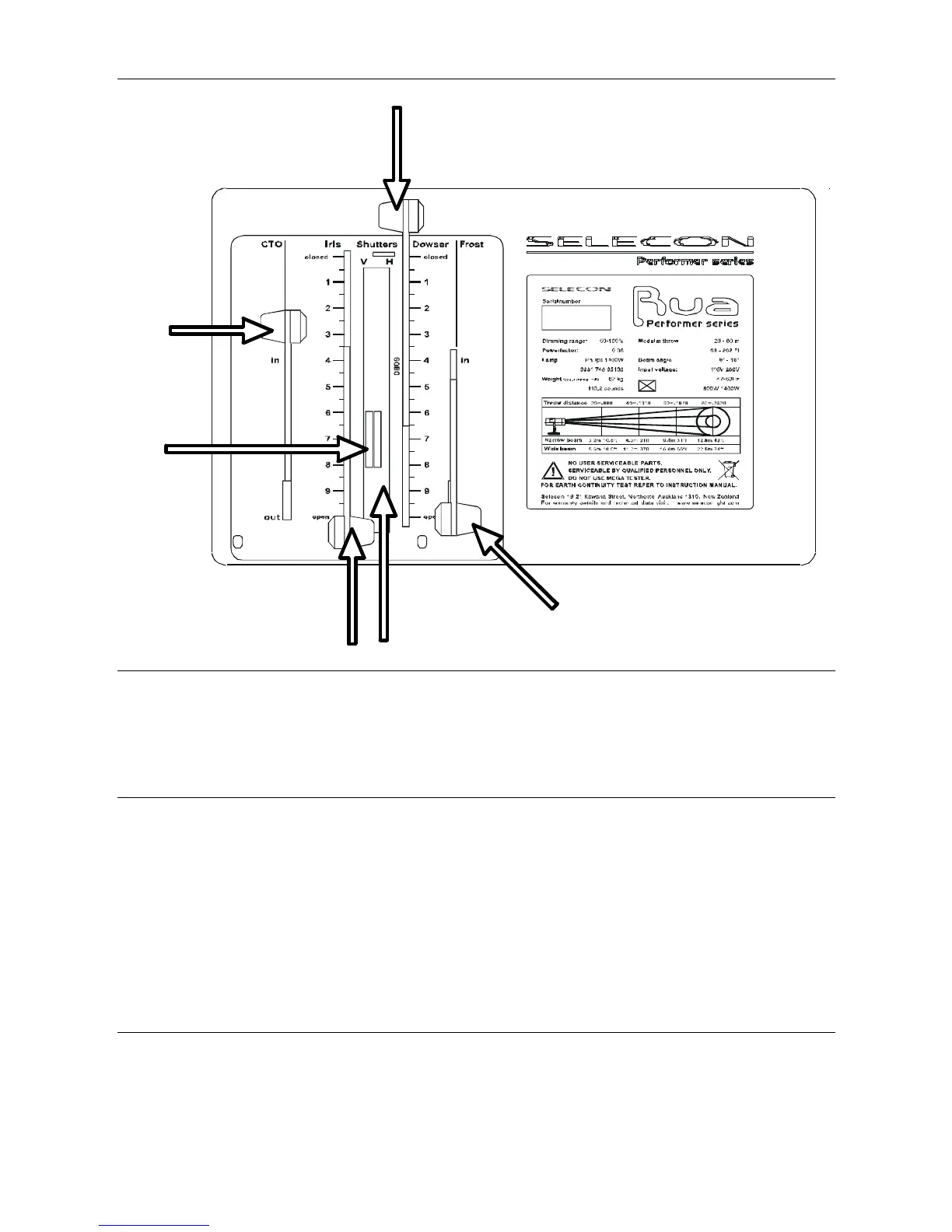
Side Control Panel
CTO Filter
Control
Shutter
Controls
Iris Control Goboholder Accessory Slot
Dowser Control
Frost Control
CTO Filter Control
The CTO Filter is used to lower the colour temperature of the beam from 6300°K to 3200°K, to balance with
halogen light sources.
The filter can be changed, refer to page 18.
Iris Control
The Iris is used to alter the size of the beam without changing the zoom control. In the closed position, the iris
is at its smallest diameter. In the open position, the iris is at its largest diameter. There is a reference scale
adjacent to the iris to record cue levels.
Important note: When setting the beam angle, ensure the iris is fully open. When
setting the focus, iris down to a small spot and set the desired focus.
The position stop on the iris is used to reduce the travel of the iris from open to closed. Turn the stop
anticlockwise to loosen it, and push down and slide it to the desired position. Turn clockwise to lock the stop in
place.
Shutter Controls
The Shutters are used to change the shape of the beam from a circular shape to a rectangular or square
shape. The V shutter control is for the vertical shutters, and the H shutter control is for the horizontal shutters.
The two shutters comprising each axis are linked.
Version 2: January 2009 © 2009 Selecon New Zealand Limited. All Rights Reserved



 To Next Page