TEC Series v 3.2X
Page 31
You will be prompted to enter a PIN. A PIN is a Personal Identification
Number. This will allow anyone who knows this number to enter the
facility the TEC controls by entering a "*" and this PIN code. Each
name may have a PIN code. The PIN code length is from one to six
digits, depending on what you selected from the system parameters menu All PIN codes must be
the same length as what was selected from the system parameters menu. When you enter the PIN
code, press the "*" key to place the PIN code into memory. If you disable the PIN (PIN length = 0),
this choice will not display.
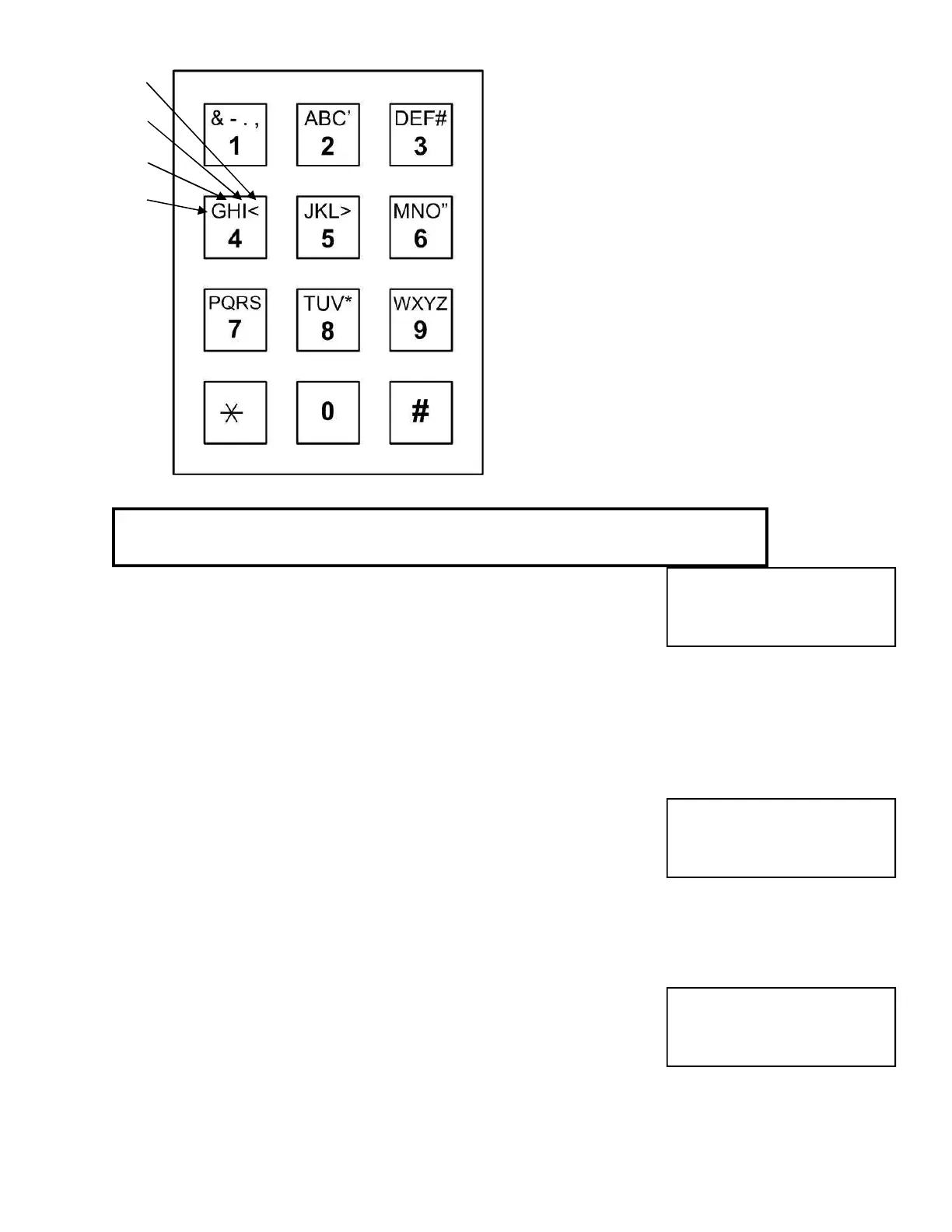
The first time you press a key, the first character
corresponding to that key will appear in the display.
To get to the second character, press the same key
a second time. To get the third character, press the
same key a third time. To skip a space, press the
"#" key. To backspace, press the "0" and the "#"
simultaneously. A backspace over an existing
character will delete that character. If you
inadvertently key past the desired character, keep
pressing the key until the desired character is in the
window. Then press the "#" key to advance to the
next space.FOR NUMBERS:
To select numbers, press the "0" key and
then the desired number key.
After completely entering the name, press
the "*" key to enter the name into memory.
You will be prompted for the phone number. Enter the numbers
normally. In this mode, letters are not possible. If you mis-key a digit
of the phone number, press the "0" and the "#" simultaneously to
backspace and correct the digit. After completely entering the phone
number, press the "*" key to enter the phone number into memory. To create a 3 second pause,
press the "#" key. For phone systems that dial an 8 or a 9 to get an outside line, key in the number
then the "#", then the phone number, then "*".
HIDE NAME FEATURE: Place a pause as the first item in the phone number (ex. #5551212). The
name will not display in the directory, but anyone who dials the code number will still be able to
reach the resident. It is not necessary to enter phone numbers in a TECCard but it is allowed for
convience.
NOTE: PRESS THE # KEY TO MOVE PAST THE LAST LETTER BEFORE
PRESSING *, OR LAST LETTER IS NOT PROGRAMMED.
PHONE # =
PIN =
Another selection in this sub-menu is the card reader number. The
TEC system allows a card number per code entry. These are five digit
numbers used with the card reader interface. If Facility Site code =
000, this selection may not display. The card number for the card that
will be given to the name must be known. Enter thIs number into
memory. If you make mistakes while keying in the number, press the "0" and the "#" key pressed
simultaneously. This will backspace over the mis-keyed digit. After entering each Card code
number, press the "*" key to place the Card code number into memory.
CARD =
4th Time
3rd Time
2nd Time
1st Time
Same as
Enter Key
# = Space
#0 =
Back


 To Next Page
 Loading...