INSTRUCTION MANUAL CODE 80002 REV E 04/2020 Page: 15
J.P. SELECTA s.a.u. Ctra. NII Km 585.1 Abrera 08630 (Barcelona) España Tel 34 93 770 08 77 Fax 34 93 770 23 62
e-mail: selecta@jpselecta.es - website: www.jpselecta.es
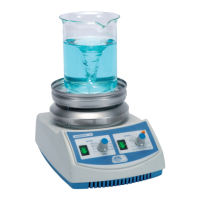
AGIMATIC-N:
For its starting up operation and to select the speed, do as the
above model, AGIMATIC-S. There is no heating until motor is
working.
Then switch on the HEATER switch, and with the regulator for
heating power, select the required “%”. The yellow lamp will show
the working of the heater.
AGIMATIC-E:
To start it working and to adjust speed, follow the above indications.
With the regulator “HEATER” the suitable working temperature may
be selected with the “ºC” knob.
STARTING UP :
AGIMATIC-S:
Once the indications in the Installation section have been made,
switch on the main switch on the rear part, place the recipient to
bestirredonthetopplate,lettheteon-coatedmagneticstirring
bar drop into the recipient, turn on the “MOTOR” switch and adjust
speed with “RPM” knob.
2. Connection for contact thermometer.
• Putthethermometerwiththebulbsubmergedintotheliquid.
Connect the thermometer in the stirrer rear part plug.
• Setthetemperatureturningthesuperiorpartofthethermometer.
Thestirrermustbeconguredtoworkatmaximumofpower
rate or temperature.
• Theconnectionisasshownongure1.
3. Connection for regulator “SENSOTERM II” (1001009)
• Puttheprobesubmergedintotheliquid.Connecttheprobein
the stirrer rear part plug.
• Setthetemperatureonthe«SENSOTERMII».
• Setthepowerrateortemperatureonthestirreratmaximum.
• Theconnectionisasshownongure2.
LIQUID TEMPERATURE CONTROL
(N & E models)
1. Connection to work without external connection of a temperature
control device.
“SENSOTERM II”
Figure 1
Figure 2



 To Next Page