
 Need help?
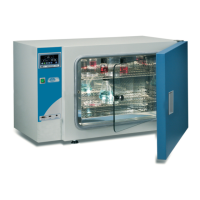
Do you have a question about the Selecta Incudigit-TFT 2001261 and is the answer not in the manual?
Details potential risks like burns and electrical hazards for the operator.
Specifies that only trained personnel should operate the equipment.
Prohibits the use of flammable, explosive, or reactive materials.
Instructions for safe maintenance, including unplugging and cleaning.
Details the one-year warranty and conditions for its validity.
Guidance on placing the equipment on a stable surface with adequate clearance.
Instructions for connecting the equipment to a suitable and earthed power socket.
Step-by-step guide for operating the oven at a constant temperature.
Overview of the interface icons and their meanings for settings.
Procedure for adjusting the internal clock and calendar settings.
Adjust PID parameters or use Autotuning for precise temperature control.
Configuration options for data logging via RS232 or USB.
Calibrate temperature, set alarms (over/under) and limits.
How to switch between Celsius and Fahrenheit units.
Instructions for selecting the user interface language.
Details the two operation modes: fixed temperature and temperature profiles.
Guide to setting a specific temperature and operating time.
How to select and run pre-programmed temperature cycles.
Interface for setting up custom temperature profiles and timed operations.
Step-by-step guide to creating temperature profiles with ramps and dells.
 General
| Brand | Selecta |
|---|---|
| Model | Incudigit-TFT 2001261 |
| Category | Laboratory Equipment |
| Language | English |


 To Next Page