INSTRUCTION MANUAL CODE 80386 REV A FEBRUARY 2020 Page: 18
J.P. SELECTA s.a.u. Autovía A-2 Km 585.1 Abrera 08630 (Barcelona) España Tel 34 937 700 877 Fax 34 937 702 362
e-mail: selecta@jpselecta.es - website: http://www.jpselecta.es
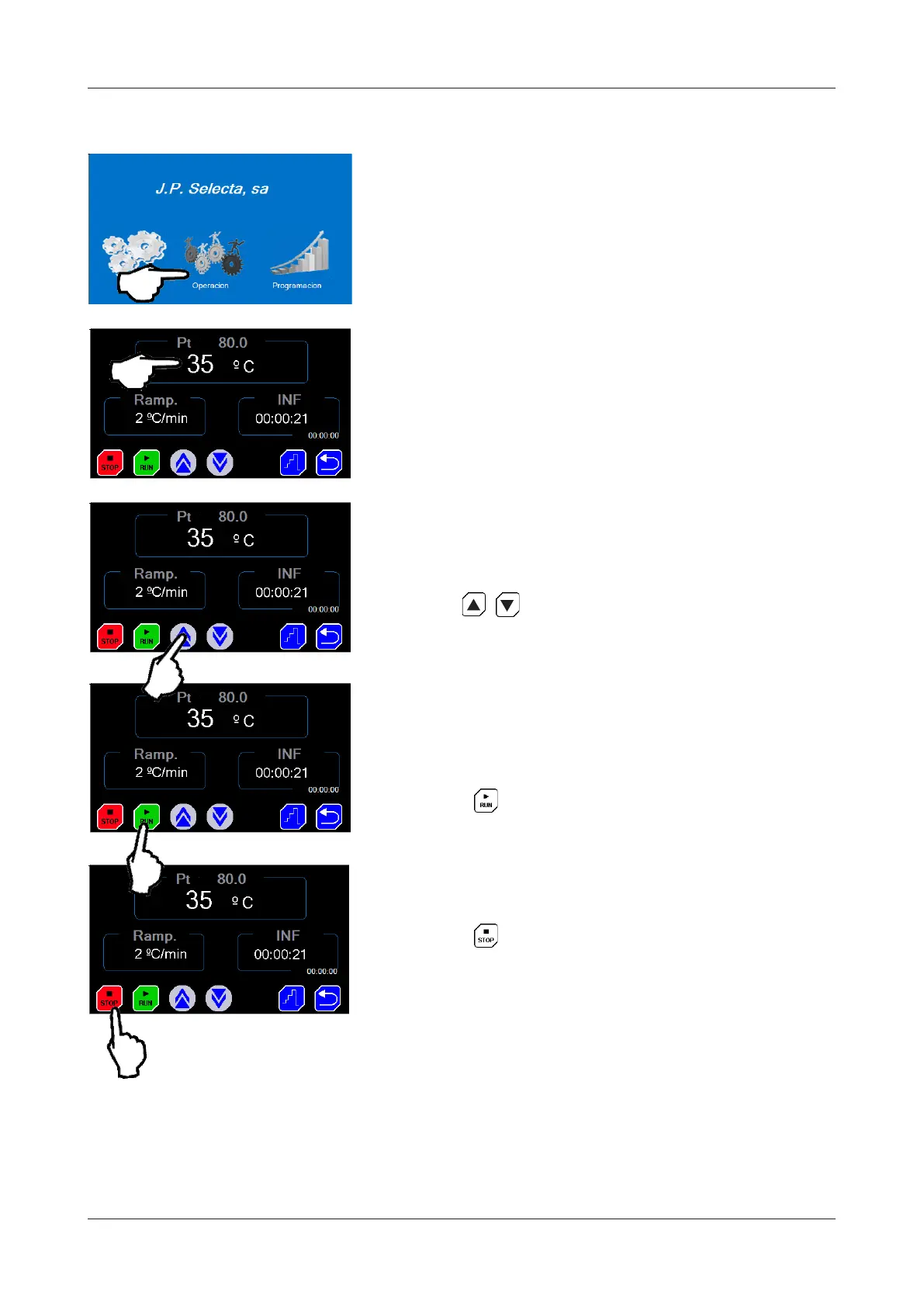
7.1Quickstarttoworkataxedtemperature
1 Press on «OPERATION».
2 Press over temperature panel. The setpoint
indicator will change to blue.
3 Press to select the setpoint tempe-
rature. Wait a few seconds to conrm the new value.
4 Press on to start.
5 Press on to end the cycle.
NOTE: at the end of the cycle, a message appears
saying that the cycle has been completed by the
user. To delete it, click on the message.
NOTE: If the oven is turned off with the ON/OFF
switch and without pressing STOP at the end of the
cycle, a power failure error message will appear each
time the equipment is started up. By clicking on the
warning, the message will disappear and you could
work normally.

 To Next Page
 Loading...