ENGLISH - 12
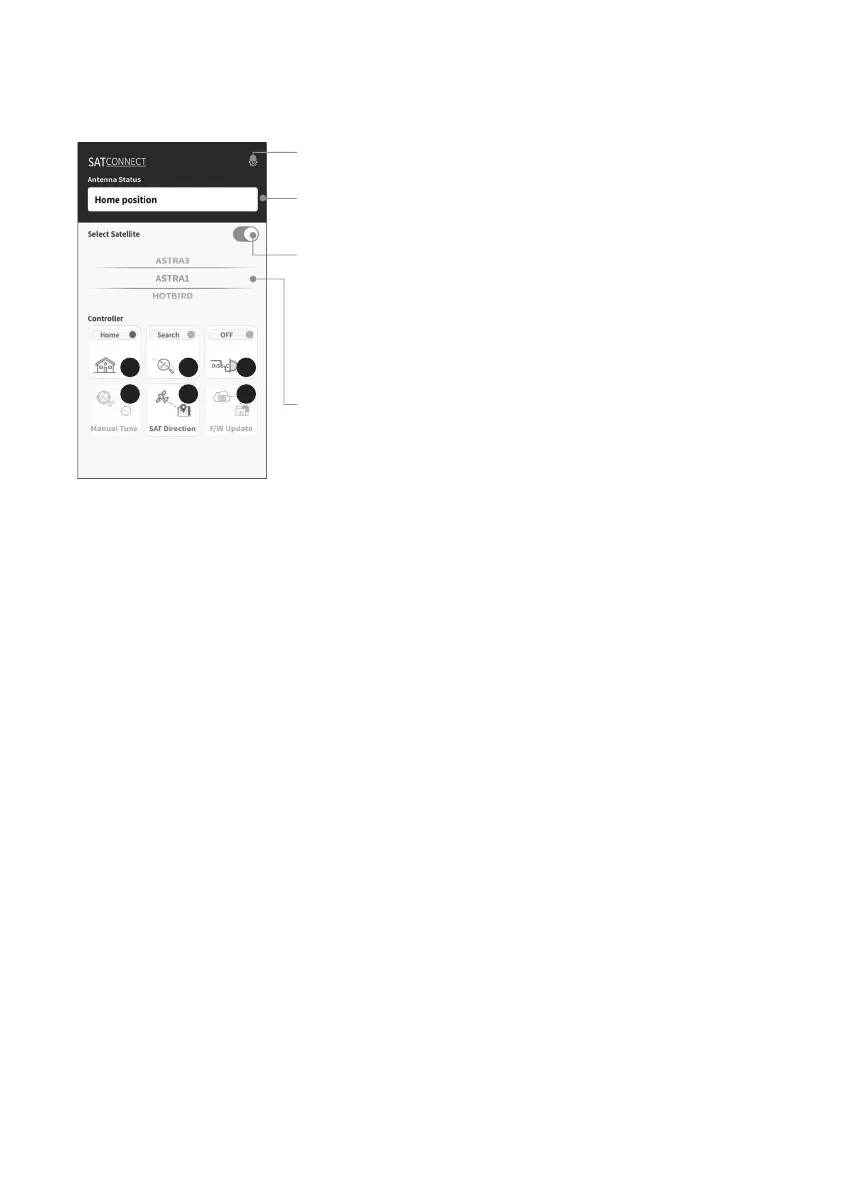
Firmware version, language setting can be checked
C. Basic Features
Setting button
Indicates the current status of the antenna
Status display window
To power off the antenna, you must first power off the STB.
Power off the STB, then press the power button to power off after
the antenna moves to the home position.
If the power button is pressed while the receiver is not powered off,
the antenna only moves to the home position and the power does
not turn off
Antenna power ON/OFF
Select a satellite to search
Satellite selection window
Used to move the antenna to the home position.
The orange lamp blinks while moving to the home, and the green lamp turns on after it has completely
moved to the home position
Used to searching satellites.
Select the desired satellite and press the button, the antenna will search for it. While searching for a
satellite, the orange lamp flashes, and when a satellite is found, the green lamp lights up
Used to set DiSEqC support of set-top box.
When DiSEqC is set, the orange lamp turns on and supports DiSEqC in the set-top box
Used to move the antenna manually.
This option is only available after completing the satellite search.
This option allows to manually move the antenna, but it does not guarantee optimal performance.
Used to check the direction of the selected satellite
Used to update the firmware of the antenna.
To update the F/W, must select a MAC address starting with WM- instead of a MAC address starting with
WP-.
"NEW" message appears when there is a new updated version of F/W
After completing the update, you need to unpair the antenna's WM-MAC address and re-pair with the
WP-MAC address.
①
②
③
④
⑤
⑥
①②③
④⑤⑥



 To Next Page