Comfort technologydivisio
“MUSA Plus Eco
Electronic control for towel radiators
Rev. 02
Sept. 201
Selmo Electronic
Viia Pacinotti, 24 - 35030 Rubano (PD) Italy- Tel 049.8976761, Fax 049.8976085 - www.selmo.it
EN
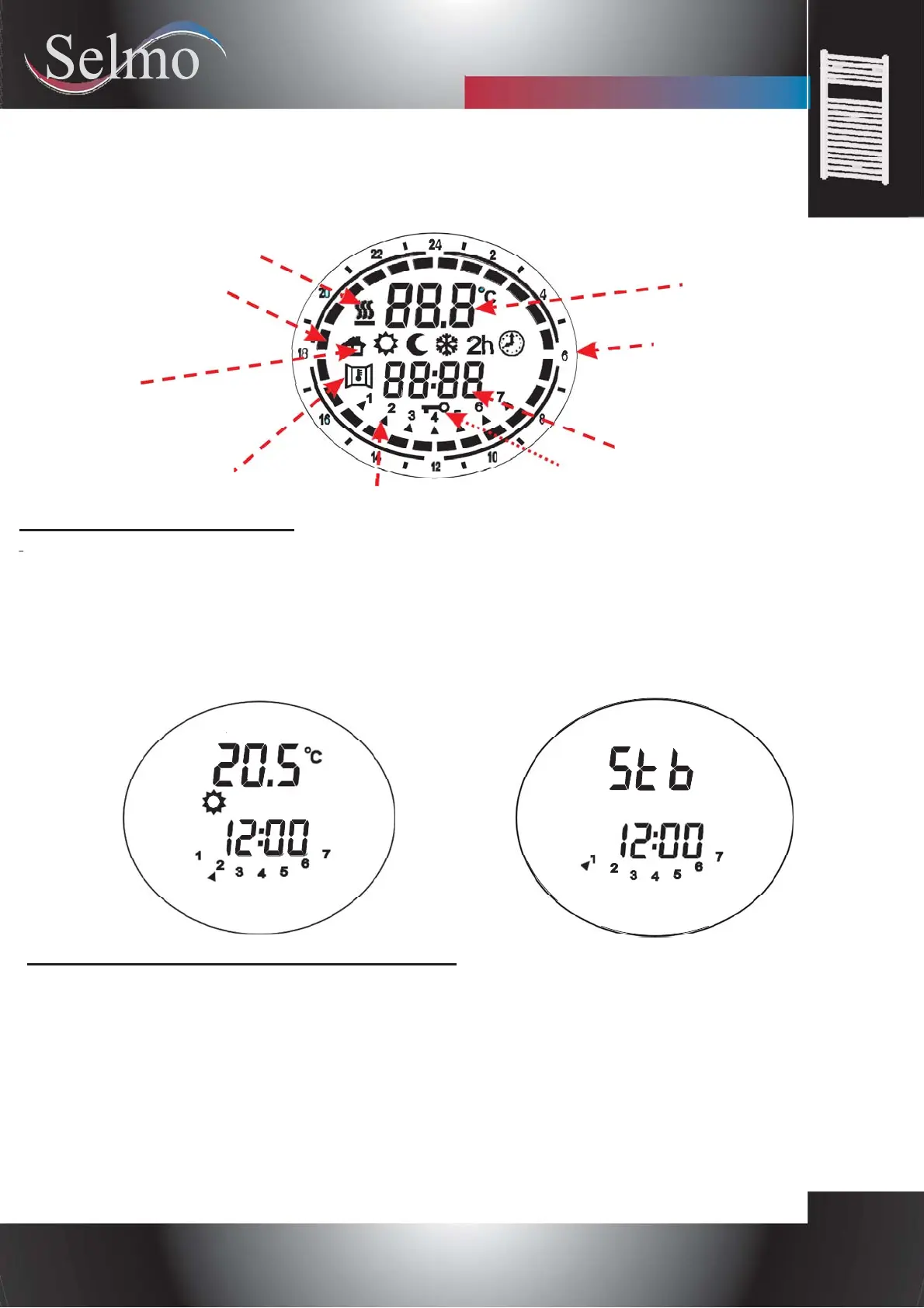
Indicator of active
heating element
Comfort/Night bar
(Chrono mode).
Configured temperature
Operating mode
icons:
-Fil-Pilote
-Comfort
-Night
-Antifreeze
-Timer 2h
Clock
24h Indicator
-Chrono
Function:
Open Window Detection.
Day of the week
Key-lock icon
1.POWER ON / STAND-BY
Press the [On/Stand-by] key to turn on the device or to enter the "Stand-by" mode.
When activated, the bottom part of the display shows the current time, while the configured operative mode and
the temperature are shown in the upper part. When in "Stand-by" mode current time, day of the week and the
message: " Stb" are displayed.
NOTE: When the device goes into "Stand-by" mode it beeps twice for 0.5s.
When the device is activated it beeps once for 1s.
Example in "Comfort" mode. Example in "Stand-by" mode.
1.“COMFORT” and “NIGHT” MODES
Two different levels of temperature can be set:
-"COMFORT" temperature: It is the temperature used for "Chrono", "Fil-Pilote" and "Comfort" modes.
-"NIGHT" temperature: It is the temperature used for the "Night" and "Chrono" modes.
The desired temperature can be set pressing the [+] e [-] buttons. The range of configurable temperature is 7°C
- 32°C.
IMPORTANT!
The temperature of "Night" mode must be below to the “Comfort” mode temperature. For this reason the
“Night” mode temperature can be set to a value between 7°C and the (configured "Comfort" mode temperature
- 0.5°C).
The temperature of "Comfort" mode can be configured in the whole (Night temperature + 0.5°C) ÷ 32°C range.


 To Next Page