42
MENU
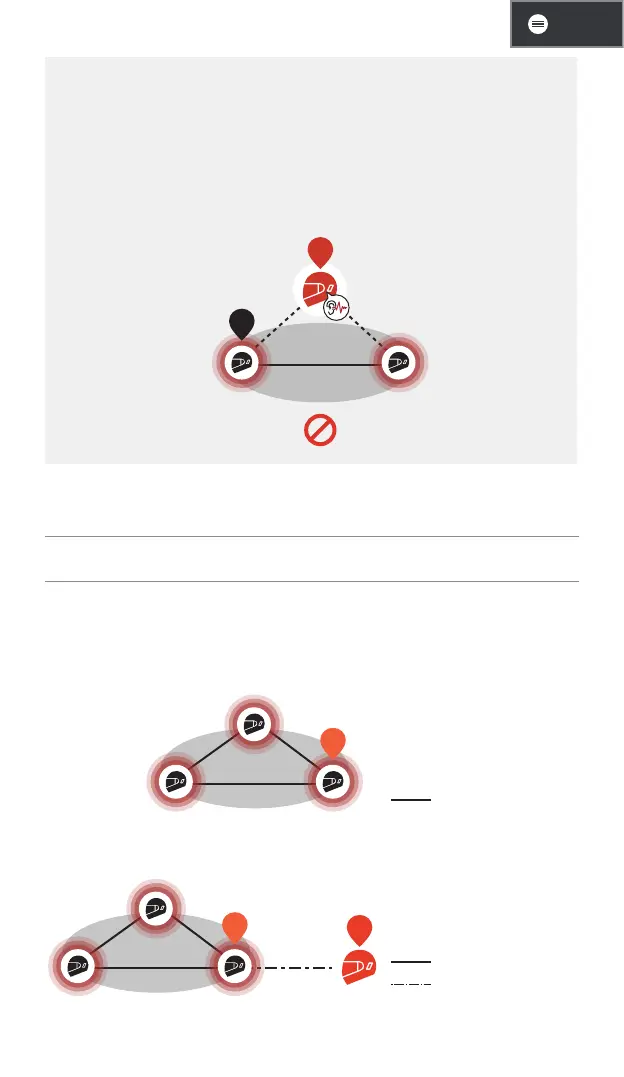
A Closed-Loop Warning
• When the 60S serves as a gateway, a closed-loop intercom can be
mistakenly created by connecting two Mesh Intercom participants
with one Bluetooth intercom user. This will cause excessive audio
noise for all participants.
• Please be aware not to create a closed-loop connection under any
circumstances.
YOU
A
Closed-
Loop
Mesh Intercom with Universal Intercom
1. Tap the Mesh Intercom button to turn on the Mesh Intercom and
join the open Mesh Intercom. You can stay in open mesh or
create a group Mesh Intercom.
YOU
Mesh Intercom
2. Start a universal intercom with the headset of another brand, B.
YOU
A
Mesh Intercom
Universal Intercom


 To Next Page