45
MENU
13
FM RADIO
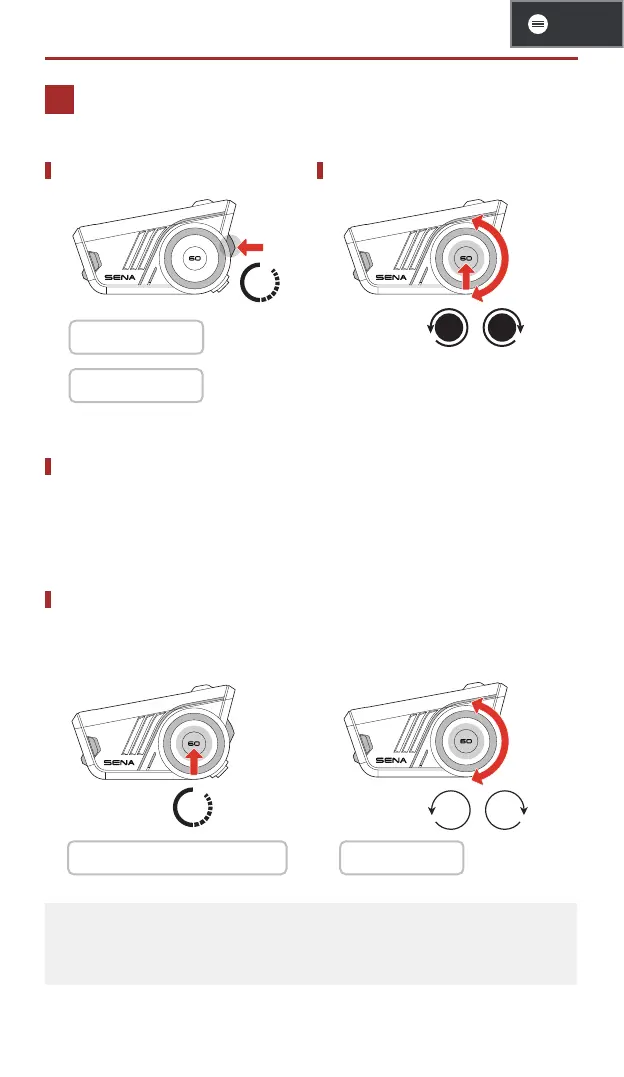
FM Radio On/Off Seek Stations
1s
1 On: "FM On"
1 Off: "FM Off"
/
Save to Preset
You can use the Sena Motorcycles app to save the station to your
preset stations.
Select Station from Preset
1. Enter into the station selection
mode.
2. Navigate forward or backward
through preset stations.
1s
/
1 "Station Selection Mode" 1 "Preset (#)"
• If you do not press any button for approximately 10 seconds, or
if you press and hold the jog dial for 1 second while in the station
selection mode, the headset will exit the station selection mode.


 To Next Page