Home
Sena
Adapter
Bluetooth Audio Pack for GoPro
Page 9 (Removing the Bluetooth Audio Pack)
Sena Bluetooth Audio Pack for GoPro - Removing the Bluetooth Audio Pack
43 pages
Manual
Save Page as PDF
To Next Page
To Next Page
To Previous Page
To Previous Page
Loading...
9
English
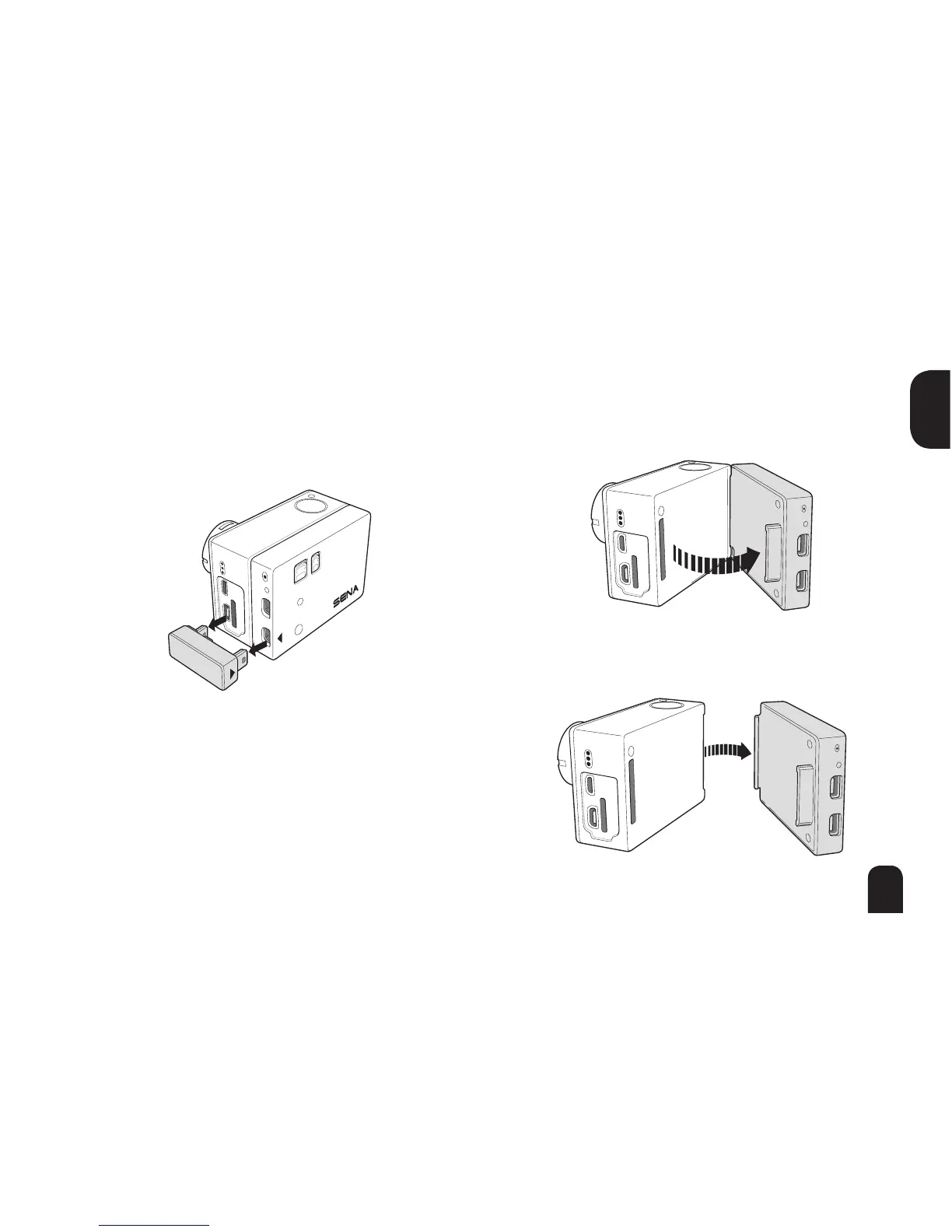
Removing the Bluetooth A
udio P
ack
from the GoPr
o®
1
Remove the A
udio Connector
.
2
Pull back on left side of the Bluetooth
Audio P
ack to disconnect from the GoPro®
bus por
t.
3
Slide the hooked end of the Bluetooth
Audio P
ack out of camera groov
e.
8
10
Table of Contents
Main Page
Default Chapter
3
Table of Contents
3
1 Introduction
5
2 Package Contents
6
3 Getting Started
8
Attaching the Bluetooth Audio Pack to the Gopro
8
Gopro
8
Installing the Frame Case
10
Installing the Waterproof Case
11
Replacing Backdoor
14
Powering on
15
Powering off
15
Charging
16
Checking Battery Level
17
Fault Reset
18
Factory Reset
19
4 Operation
20
Pairing with Headsets
21
Start Recording
22
Ultra HD Voice Recording Mode & Normal Voice Recording Mode
25
Sidetone Setting
26
Bluetooth Audio MIX
26
Firmware Upgrade
27
5 Operation Quick Reference
28
6 Specifications
29
Certification and Safety Approvals
30
FCC Compliance Statement
30
FCC RF Exposure Statement
31
FCC Caution
31
CE Declaration of Conformity
31
Industry Canada Statement
32
Bluetooth License
32
WEEE (Waste Electrical and Electronic Equipment)
33
Safety Information
33
Product Storage and Management
33
Product Use
34
Battery
35
Product Warranty and Disclaimer
36
Limited Warranty
36
Warranty Exclusions
39
Warranty Service
41
Return for Full Refund
42
Related product manuals
Sena SR10
38 pages
Sena FREEWIRE
20 pages
Sena 50 Series
2 pages
Sena +MESH
17 pages
Sena Parani-UD100
27 pages
Sena Parani-SD1000
55 pages
Sena MESHPORT RED
22 pages


 To Next Page