EasyManua.ls Logo

Sencor SBP 901 - Recalling and Deleting Measurements

Sencor SBP 901
14 pages
Print Icon
To Next Page IconTo Next Page
To Previous Page IconTo Previous Page
Loading...
Digital
Blood
Pressure
Monitor
with
Cuff
SBP
901
3.3.5
Turn
off
the
device
by
pressing
the
START/STOP
button.
If
you
do
not
turn
off
the
device,
it
will
turn
itself
off
automatically
1
minute
after
the
last
measurement.
Remove
the
cuff
from
your
arm
after
completing
the
measurement.
4.
Recalling
memory
41
To
display
the
stored
measurement
results
touch
the
А
MEM
sensor.
The
display
will
show
the
symbol
for
displaying
memory
Q
and
the
average
values
of
the
stored
measurement
results.
The
average
values
of
the
stored
measurement
results
are
indicated
by
the
symbol
Gla).
42
To
scroll
through
the
individual
measurements
in
memory,
use
the
touch
sensors
А
МЕМ
and
SET
V.
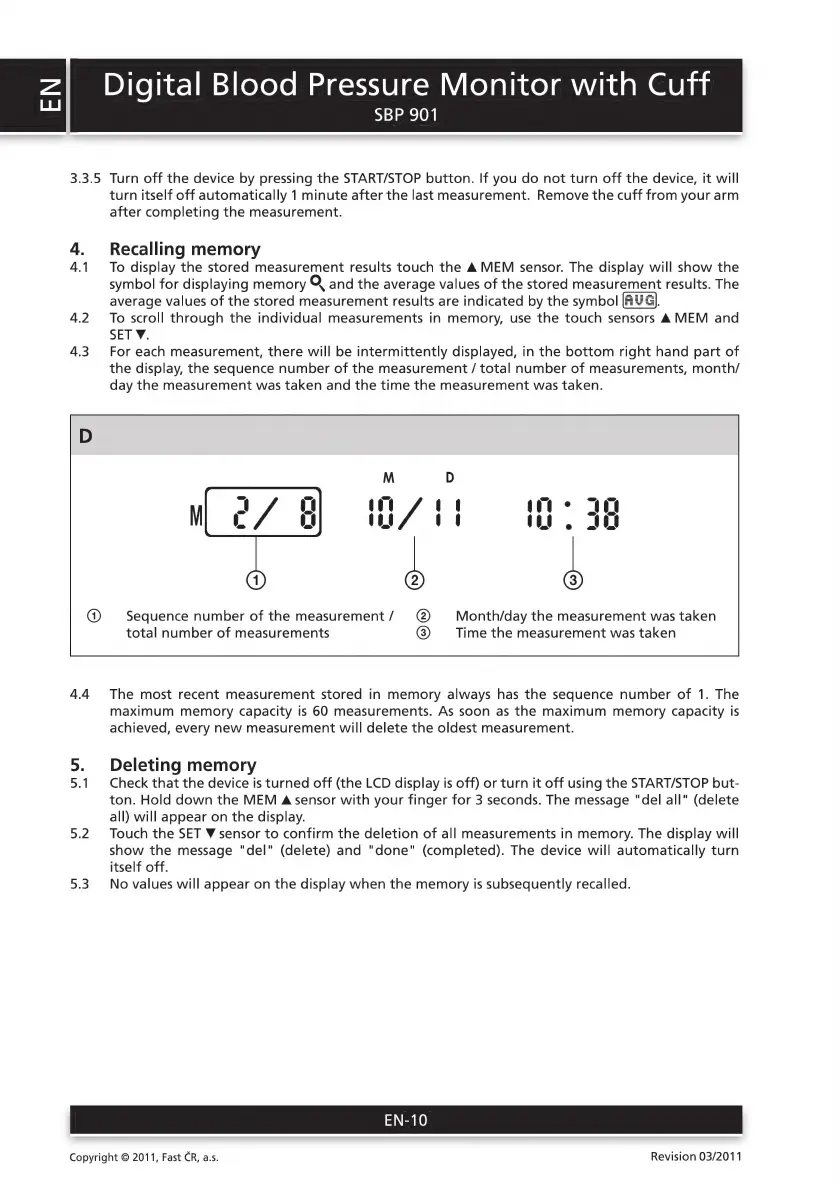
43
For
each
measurement,
there
will
be
intermittently
displayed,
іп
the
bottom
right
hand
part
of
the
display,
the
sequence
number
of
the
measurement
/
total
number
of
measurements,
month/
day
the
measurement
was
taken
and
the
time
the
measurement
was
taken.
/
@)
Sequence
number
of
the
measurement/
(©)
Month/day
the
measurement
was
taken
total
number
of
measurements
@
Тие
the
measurement
was
taken
44
Тһе
most
recent
measurement
stored
in
memory
always
has
the
sequence
number
of
1.
The
maximum
memory
capacity
is
60
measurements.
As
soon
as
the
maximum
memory
capacity
is
achieved,
every
new
measurement
will
delete
the
oldest
measurement.
5.
Deleting
memory
5.1
Check
that
the
device
is
turned
off
(the
LCD
display
is
off)
or
turn
it
off
using
the
START/STOP
but-
ton.
Hold
down
the
MEM
Asensor
with
your
finger
for
3
seconds.
The
message
"del
all"
(delete
all)
will
appear
on
the
display.
5.2
Touch
the
SET
W
sensor
to
confirm
the
deletion
of
all
measurements
in
memory.
The
display
will
show
the
message
"del"
(delete)
and
"done"
(completed).
The
device
will
automatically
turn
itself
off.
5.3
No
values
will
appear
on
the
display
when
the
memory
is
subsequently
recalled.
EN-10
Copyright
©
2011,
Fast
CR,
a.s.
Revision
03/2011

Related product manuals