14 - EN
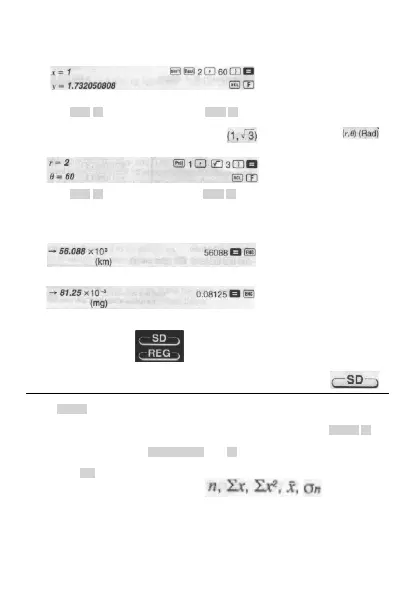
Coordinate Conversion (Pol (x, y), Rec (r, θ))
• Calculation results are automatically assigned to variables E and F.
•
Example 1: To convert polar coordinates (r=2, θ=60°) to rectangular coordinates (x
r
y] (Deg)
• Press RCL E to display the value of x, or RCL F to display the value of y.
• Example 2: To convert rectangular coordinates (
) to polar coordinates ( )
(Rad)
• Press RCL E to display the value of r, or RCL F to display the value of θ.
Engineering Notation Calculations
•
Example 1: To convert 56,086 meters to kilometers
•
Example 2: To convert 0.08125 grams to milligrams
Statistical Calculations
Standard Deviation
Use the MODE key to enter the 3D Mode when you want to perform statistical calculations using
standard deviation.
SD ........................................................................................................... MODE 2
• Always start data input with SHIFT CLR 1 (Scl) = to clear statistical memory.
• Input data using the key sequence shown below.
<x-data> DT
• Input data is used to calculate values for n,
and σ
n-1
which
you can recall using the key operations noted nearby.
© FAST ČR a. s.



 To Next Page