7 - EN
Basic Calculations
Arithmetic Calculations
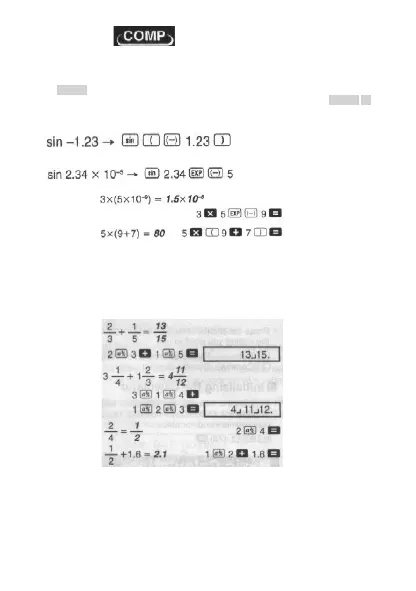
Use the MODE key to enter the COMP Mode when you want to perform Basic calculations.
COMP ...................................................................................................... MODE 1
• Negative values inside of calculations must be enclosed within parentheses.
• It is not necessary to enclose a negative exponent within parentheses.
•
Example 1:
Example 2:
Fraction Operations
Fraction Calculations
• Values are displayed in decimal format automatically whenever the total number of digits of
a fractional value (integer + numerator + denominator + separator marks) exceeds 10.
•
Example 1:
• Example 2:
• Example 3:
• Example 4:
• Results of calculations that mix fraction and decimal values are always decimal.
•
Decimal Fraction Conversion
• Use the operation shown below to convert calculation results between decimal values and
fraction values
• Note that conversion can take as long as two seconds to perform.
© FAST ČR a. s.



 To Next Page