8 - EN
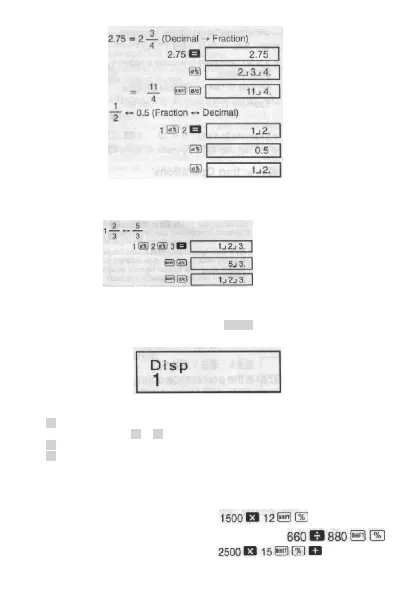
• Example 1:
• Example 2:
• Mixed Fraction rrr Improper Fraction Conversion
• Example:
• You can use the display setup (Disp) screen 10 specify the display format when a fraction
calculation result is greater then one.
• To change the fraction display format, press the MODE key a number of times until you
reach the setup screen shown below.
• Display the selection screen.
1
• Press the number key ( 1 or 2 ) that corresponds to the setting you want to use.
1 (a
b
/
c
): Mixed fraction
2 (d/c): Improper fraction.
• An error occurs if you try to input a mixed fraction while the d/c display format is selected.
Percentage Calculations
•
Example 1: To calculate 12% of 1500 (180)
•
Example 2: To calculate what percentage of 880 is 660 (75%)
•
Example 3: To add 15% onto 2500 (2875)
© FAST ČR a. s.



 To Next Page