7
8
11
12
13
14
18
16
17
15
AD
PR
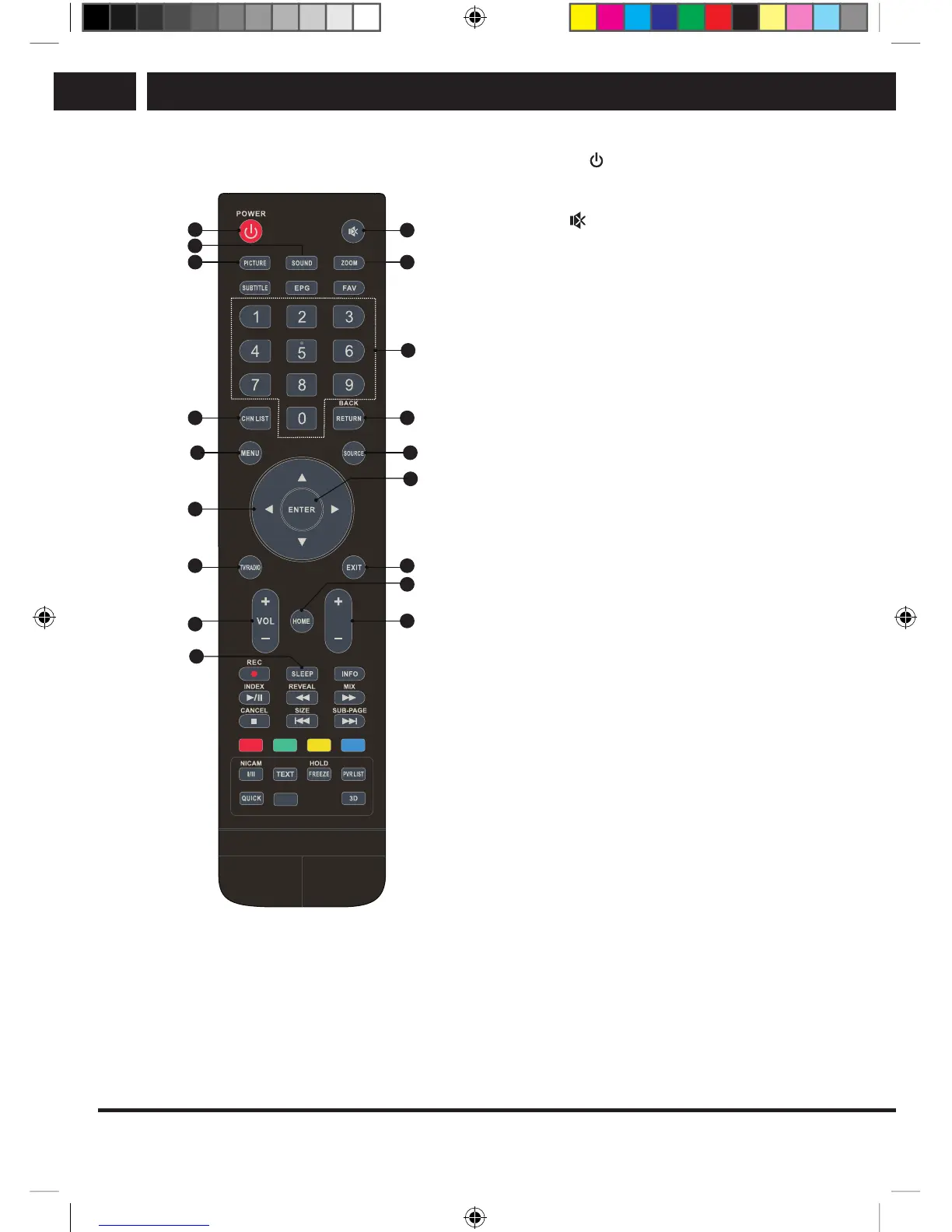
1. POWER ( )
Press to switch the TV on or switch to
standby mode.
2. Mute (
)
Press to mute sound or to restore volume.
3. PICTURE
Changes the picture mode.
4. SOUND
Changes the sound mode.
5. Zoom
Changes the aspect ratio.
6. Numerical buttons
Direct channel selection.
7. CHN LIST
Press to display the channel list.
8. RETURN
Press to return to the previously viewed
channel.
9. MENU button
Opens the menu.
10. SOURCE
Selection of input sources.
11. Up/down/left/right (v/V/b/B)
Navigating the menu.
12. ENTER
Selection confirmation.
13. TV/RADIO
Switching between television and radio.
14. EXIT
Leave the current menu.
15. HOME
Displays the home screen. This button
will not work If your TV is not equipped
with the HOME feature.
16. Increase/decrease volume (VOL+/VOL-)
Increase or decrease volume.
17. Next/previous program (PR+/PR-)
Switching channels forward or back.
18. SLEEP
Set sleep timer, for example to
10minutes, 20 minutes, etc.
SLE SLE 2464TCS + SLE 3258TCS EN+CZ+SK+HU+PL.indb 14 08.09.2016 0:57:28



 To Next Page