16 EN
EN
Revision 09/2016Copyright © 2016, Fast ČR, a. s.
Remote controller
32
33
34
AD
PR
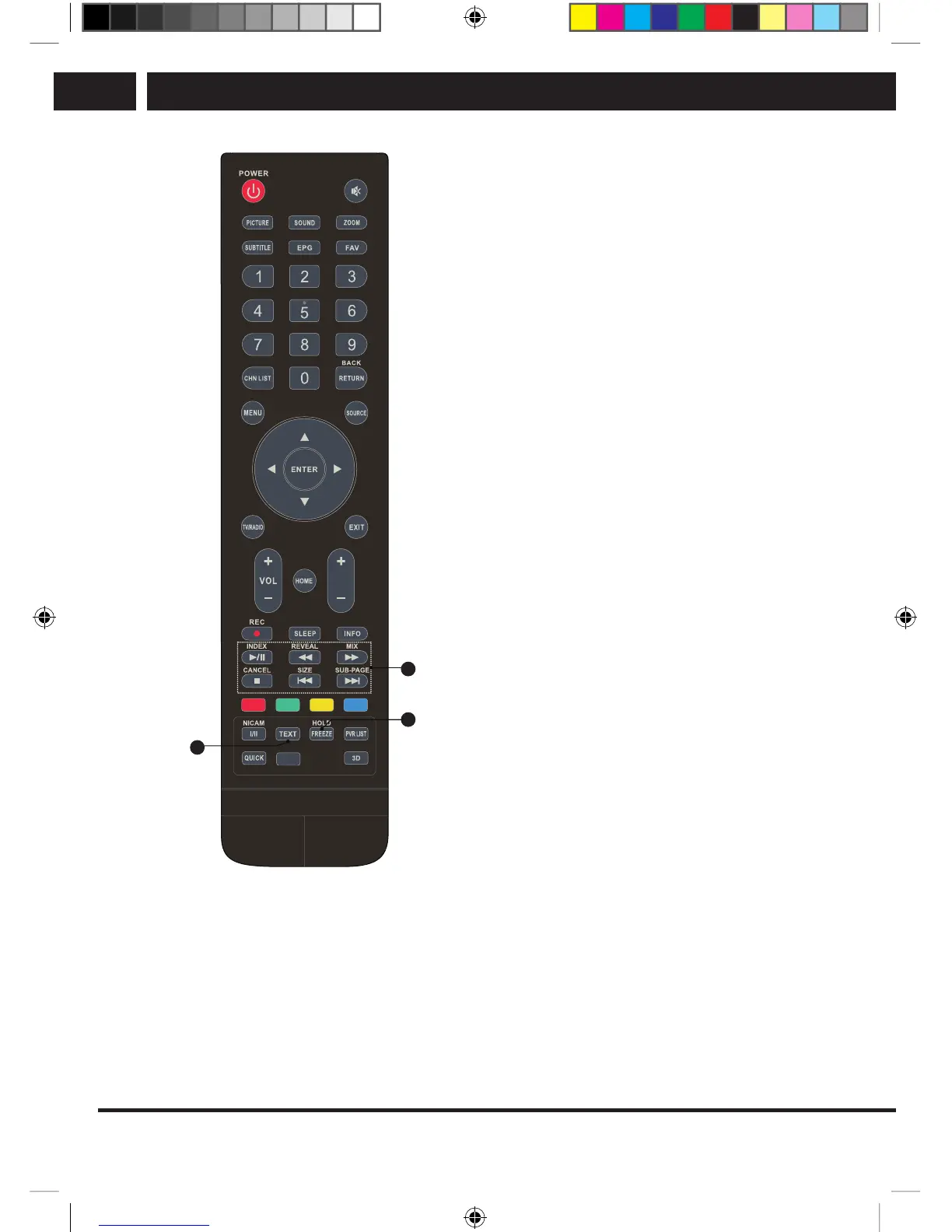
Teletext control buttons
32. TEXT
Press to enter or exit the teletext menu.
33. HOLD
Press to pause the teletext page on the
screen without updates and changes.
Press again to dismiss the hold.
34. Other buttons
SIZE
Zoom display of teletext: Press once to
enlarge the top half of the screen. Press
again to enlarge the bottom half of the
screen. Press again to return to regular
screen size.
REVEAL
Press this button to reveal hidden
information, for example solutions to
riddles and puzzles. Press again to
conceal the information.
MIX
Press this button to blend teletext with TV
broadcasting.
Press again to return to the regular
teletext mode.
SUB-PAGE
Press this button to activate or deactivate
the sub-page mode (if asub-page is
available). Select the desired sub-page by
pressing the red/green button.
INDEX
Press this button to display the content
page.
CANCEL
Press this button to return temporarily to
viewing television while ateletext page is
loading from search. When the search is
finished, the page number appears in the
top left corner of the screen.
Press again to return to the teletext page.
SLE SLE 2464TCS + SLE 3258TCS EN+CZ+SK+HU+PL.indb 16 08.09.2016 0:57:28



 To Next Page