EN – 9
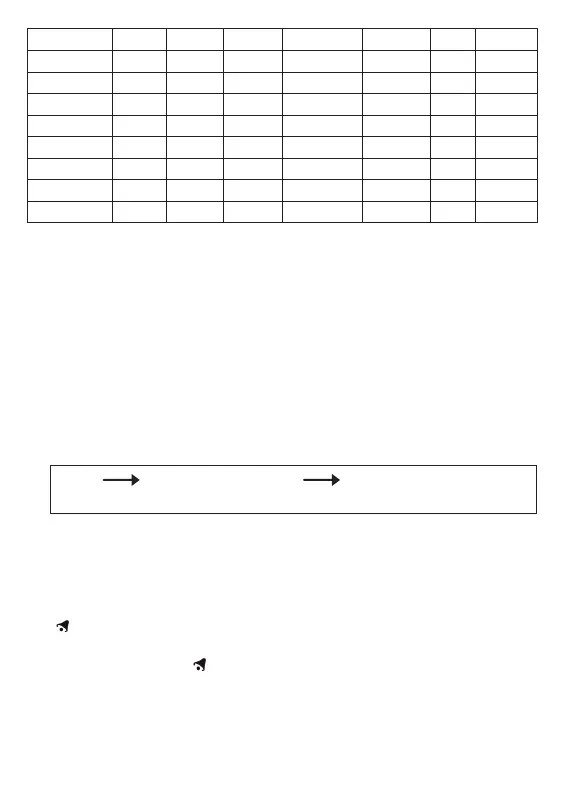
Language Sunday Monday Tuesday Wednesday Thursday Friday Saturday
German, GE SO MO DI MI DO FR SA
English, EN SU MO TU WE TH FR SA
Russian, RU BC ПН BT CP ЧТ ПТ СБ
Denmark, DA SO MA TI ON TO FR LO
Dutch, NE ZO MA DI WO DO VR ZA
Italian, IT DO LU MA ME GI VE SA
Spanish, ES DO LU MA MI JU VI SA
French, FR DI LU MA ME JE VE SA
Note:
(1) Second adjusted to zero only.
(2) The Time Setting Mode will automatically exit in 15 seconds without
any adjustment.
(3) The Time zone is used for the countries where can receive the DCF
time signal but the time zone is different from the German time.
When the country time is faster than the German time for 1 hour, the
zone should be set to +1. Then the clock will automatically set 1 hour
faster from the signal time received.
8.3 Daily Alarm Function:
• Press “ MODE” button (B10) to select to view:
Time Time & Day of Week Alarm Time (“AL” shown
on the LCD)
• When viewing the Alarm Time, hold “MODE” button (B10) for 3
seconds to enter Alarm Time setting. Press “+” (B3) or “-” (B4) button
to adjust the alarm time. Press “MODE” button (B10) to confi rm the
setting.
• Press “AL ON/OFF” button (B3) to switch alarm on or off. If it is on,
“ ” shown on the LCD.
• When Alarming, press “SNOOZE / LIGHT” button (B1) to activate
the snooze alarm, (“ ” fl ash on the LCD). The alarm will snooze for
around 5 minutes, then it alarms again. This snooze function can be
enabled for maximum 7 times.



 To Next Page