VP400 Series Video Pro Form7343A Operation Manual
35
S-Video (NTSC) to S-Video Input
A two wire video interface consisting of a separate luminance signal and a color sub-carrier
signal is commonly used to interface NTSC video. This interface is called “S-Video” describing
the super video performance achieved using this interface compared to composite video. S-video
provides slightly higher bandwidth and reduces display artifacts attributed to separating the
luminance and color information of the composite video signal. S-Video originated with the
introduction of Super VHS, Super Beta, and other high performance VCR formats. An S-video
generator can be used to substitute a signal into an S-video input for testing and aligning video
equipment.
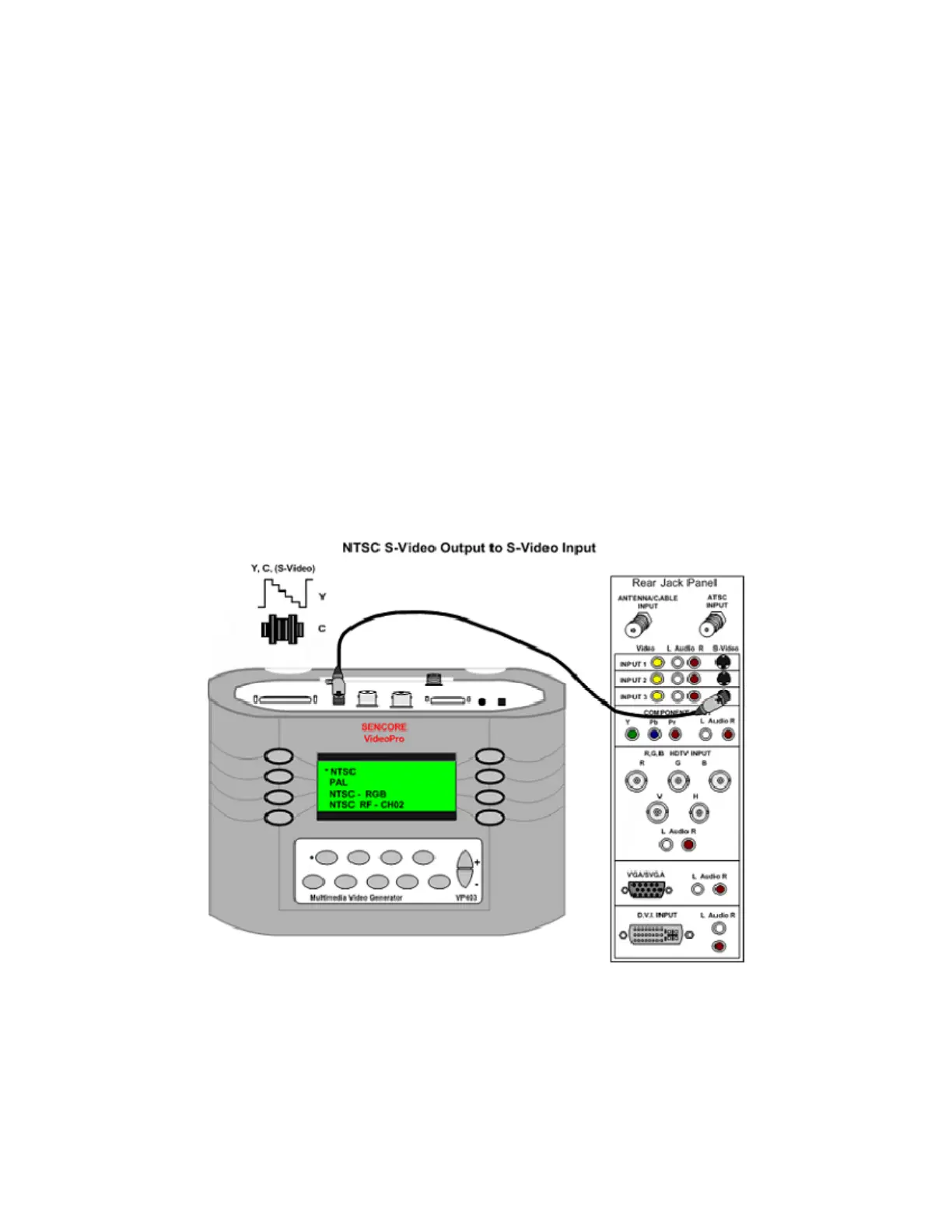
To test the S-Video input, connect the S-video
Cable (39G270) from the S-Video Output
jack of the generator to the S-video input jack
of the display. To output an S-video signal
from the generator, select the NTSC/PAL
selection in the Signal Type menu. Select the
NTSC selection in the Format menu. Select
the S-video input from the receiver/monitors
input menu screen. Note: Some displays
automatically sense the presence of a signal to
the S-video input when the same display input
has a composite video input jack. The
receiver/monitor should process the
composite video signal and display the video
test pattern. Select the desired test pattern
from the Pattern menu.



 To Next Page