PT300 QuickStart Guide
Sendum Wireless Corporation
4500 Beedie Street, Burnaby, BC V5J 5L2
www.sendum.com
-- 6 --
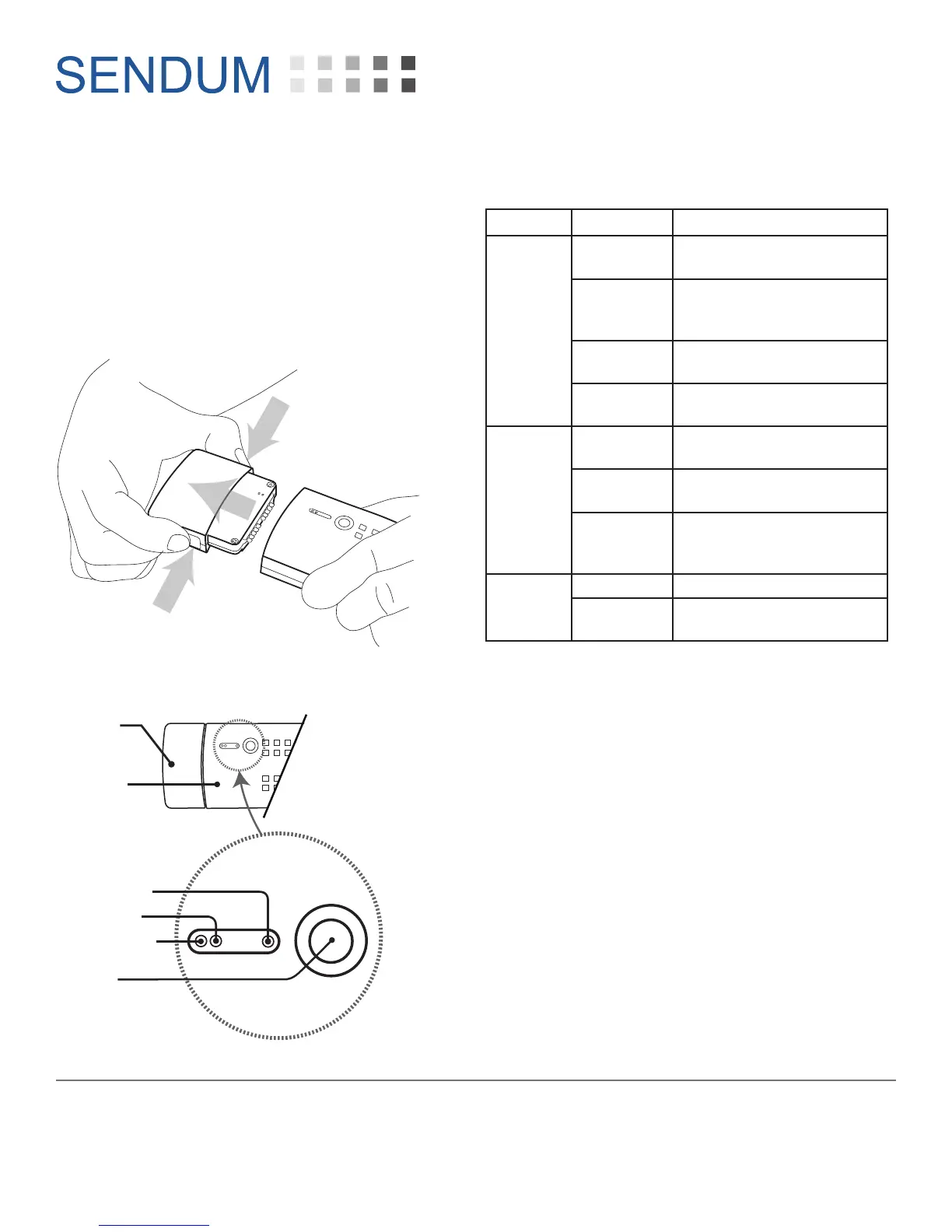
2. Turning off your PT300
To turn off (or power down) your PT300, simply
unplug the PT300 Command Module from your
Sensor or Accessory Pack.
To do this, squeeze the two tabs on the side of
the command module, then pull the module
straight out of the pack.
3. LED Lights and Status Button
SENDUM
Status
Button
Charger
Battery
Network
LED Indicators:
PT300/
PT300D
Sensor or
Accessory
Pack
4. LED Light Indications
LED Status Description
Network
Green
Device in carrier coverage
area
Green
(Blinking)
Device is in Aircraft
Transmission Suppression
Mode
Red
Device out of carrier
coverage area
Red
(Blinking)
Device is in Coverage Sleep
Mode
Battery
Green
Sensor Pack charge level
near full (80%+)
Red
Sensor Pack needs
recharging
Red
(Blinking)
Sensor Pack charge level
good (approximately
20-80%)
Charger
Red Sensor Pack is charging
Green
Sensor Pack charging is
complete


 To Previous Page