PT300 QuickStart Guide
Part Number BFA10068 (for Verizon)
-- 5 --
Appendix
1. Turning on your PT300
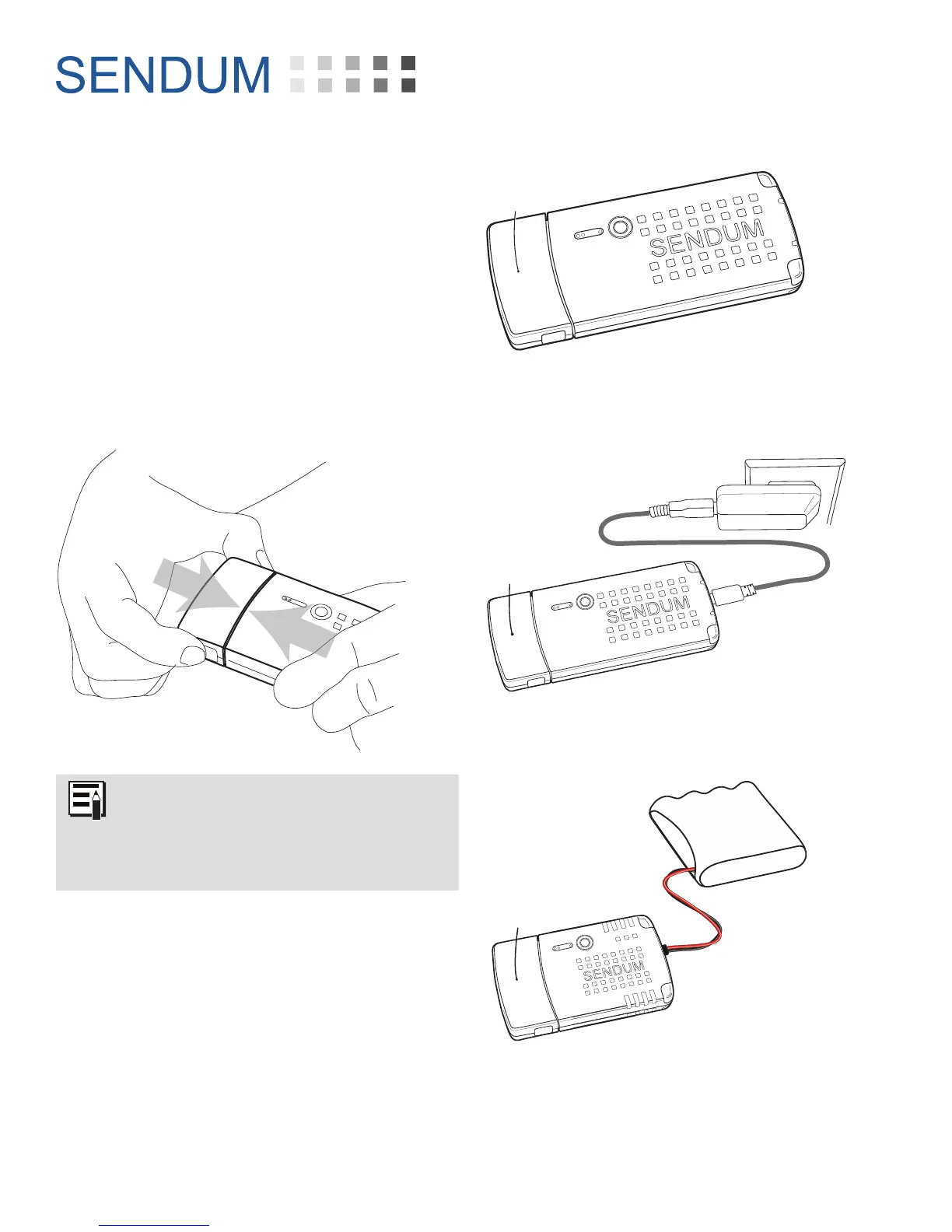
You can turn on (i.e. power up) your PT300 by
connecting the command module to a Sensor
or Accessory Pack.
To make the connection, simply push the
command module into the pack until you hear
a click sound. Once connected, ensure the
Charger LED is ON. The color will be either red
or green.
When connecting any type of Sensor
or Accessory Pack to the Command
Module, always make sure the
connection is solid and that you hear
the confirming “Click” sound.
Sensor Pack
AC Adapter
Data Cable
PT300
Command
Module
Sensor Pack with sufficient
battery charge
PT300
Command
Module
PT300
Command
Module
Accessory Pack
10K mAh Battery Pack
with sucient charge
Figure 5 - Turning the PT300 on by connecting it
with a charged Sensor Pack
Figure 6 - Turning the PT300 on by connecting it
with a Sensor Pack being charged
Figure 7 - Turning the PT300 on by connecting it
with an Accessory Pack and a charged 10K mAH
Battery Pack


 To Next Page