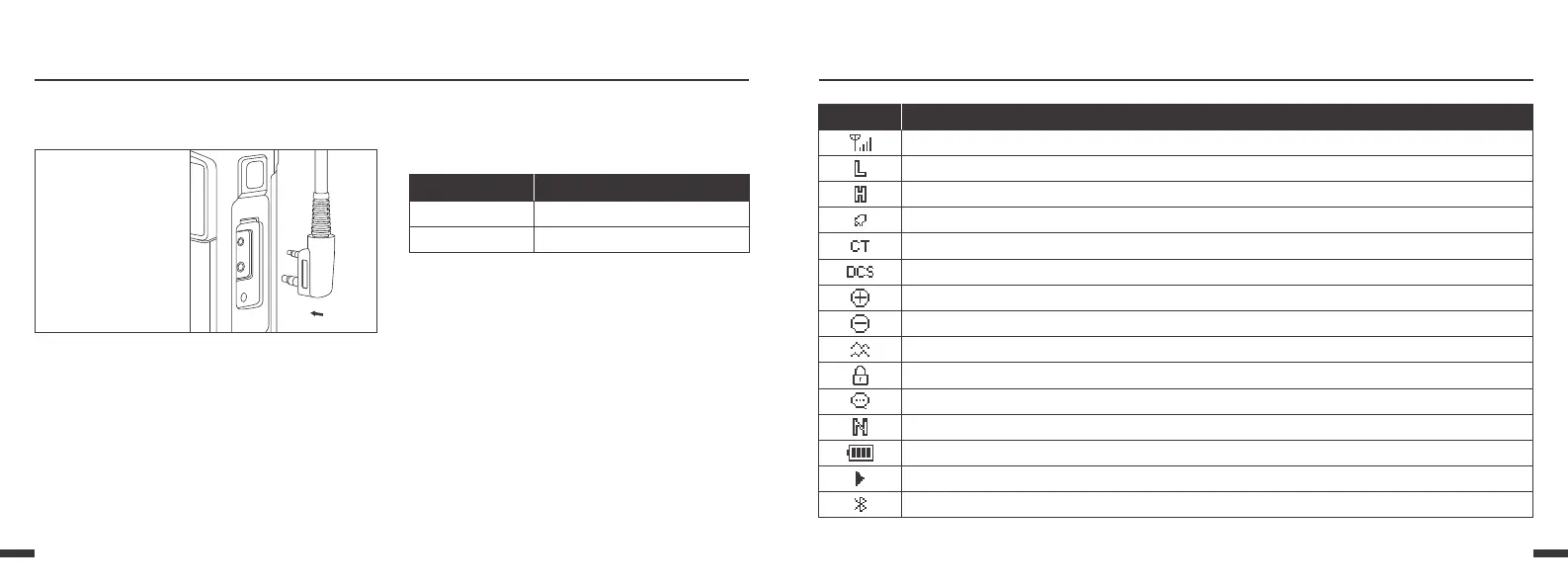
Preparation Status Indication LCD Icons
LED Indicator
Uif!upq!MFE!joejdbups!xjmm!ifmq!zpv!fbtjmz!jefoujgz!
dvssfou!sbejp!tubuvt/
Radio Status
Transmitting
Receiving
LED glows red
LED glows green
LED Indicator
Installing the Optional
Speaker/Microphone(or Headset)
Insert the
speaker/micro-
phone (or headset)
plugs into the
speaker/micro-
phone jacks.
0908
Icon
Radio status
Signal Strength Level
Low Power
High Power
DTMF activated
CTCSS activated
Keypad lock function activated. Press 【
*
】 Key for 2 Seconds to unlock the keypad
VOX function enabled
Narrow Band selected
Battery Level indicator
A/B Band Direction, Operation frequency
Bluetooth programming function activated
DCS activated
Position: TX frequency = RX frequency + Offset frequency
Negative: TX frequency = RX frequency - Offset frequency
Dual watch/ dual reception functions activated


 To Next Page