Standard Gas Calibration
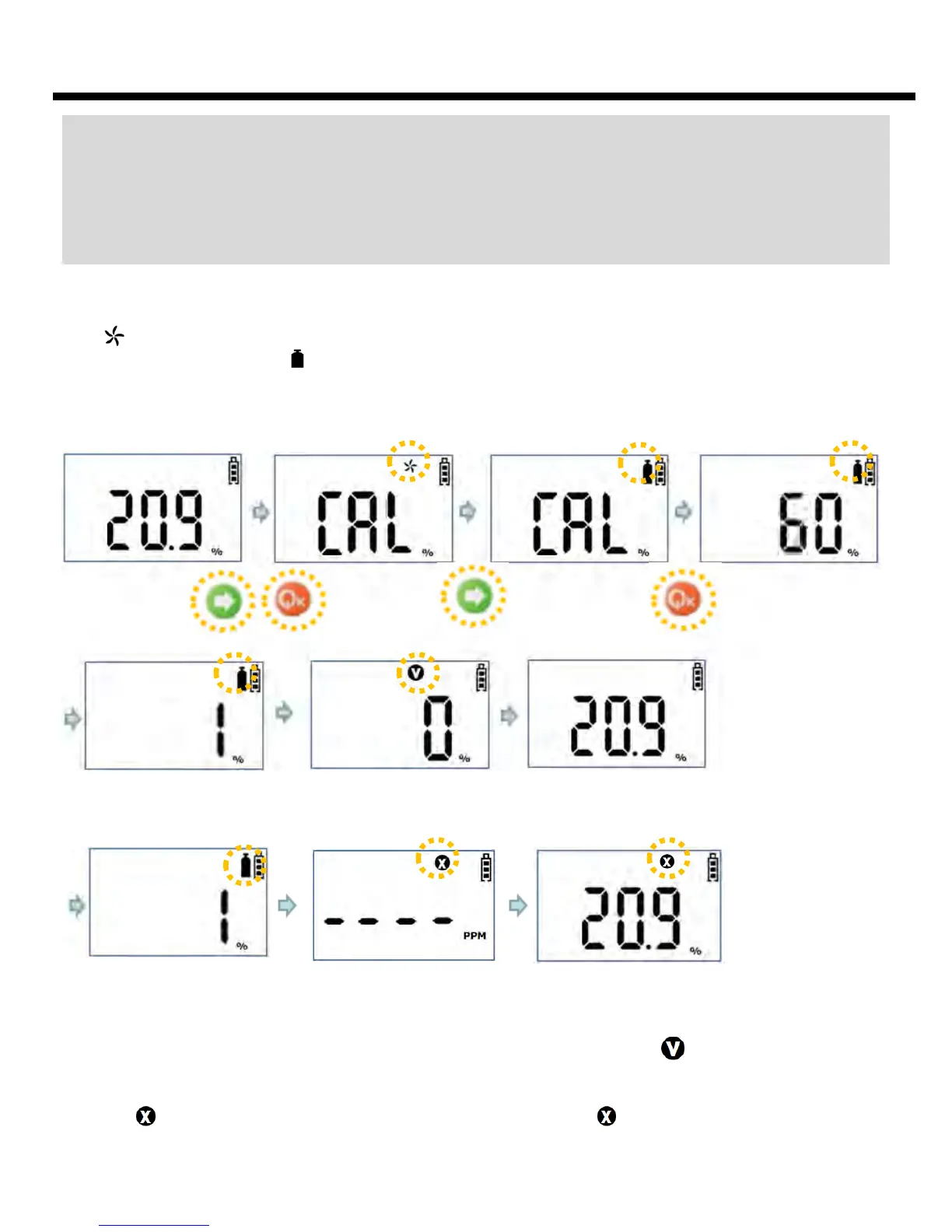
Icon blinks when Power key is pressed for 3 seconds at the state of pushing Arrow key
simultaneously. And icon blinks by input of Arrow key at the state. Standard Gas Calibration
starts by pressing Power key for longer than 5 seconds. Be careful not to proceed with
Calibration at the state without connecting with Standard Gas.
Caution: Fresh Gas Calibration should be performed at the environment of fresh air without
any influence of other gases, since the calibration is performed on the assumption that the
concentration of Oxygen is 20.9%, that of Inflammable Gas is 0%LEL, and the concentration
of Toxic Gas is 0ppm in the fresh air. Accordingly it is not recommended to perform Fresh
Air Calibration at the closed space, and it should be avoided to perform the calibration
where gases can be inhaled by operators.
When Standard Gas Calibration starts, in case of Oxygen, Calibration proceeds by the
countdown for 60 seconds. If the Calibration is normally executed, the concentration value of
the gas connected at the moment is indicated with blinking of icon and alarm sound.
Afterwards, it indicates the concentration value measured at the moment, when Standard Gas
is disconnected. If the Calibration fails, program returns to Gas Measure Mode after blinking
of icon for 3 seconds with alarm sound. In this case, icon blinks continuously. If this
occurrence repeats, please consult a dealer or aftercare center to replace the sensor.
Calibration
Success
Hold 5 secs
60secs count down
Concentration of
Standard gas
Disconnect from
standard gas
60secs count down
Calibration
Fail
8


 To Next Page