18 | All-Day Clear All-Day Clear | 19
Control at your fingertips
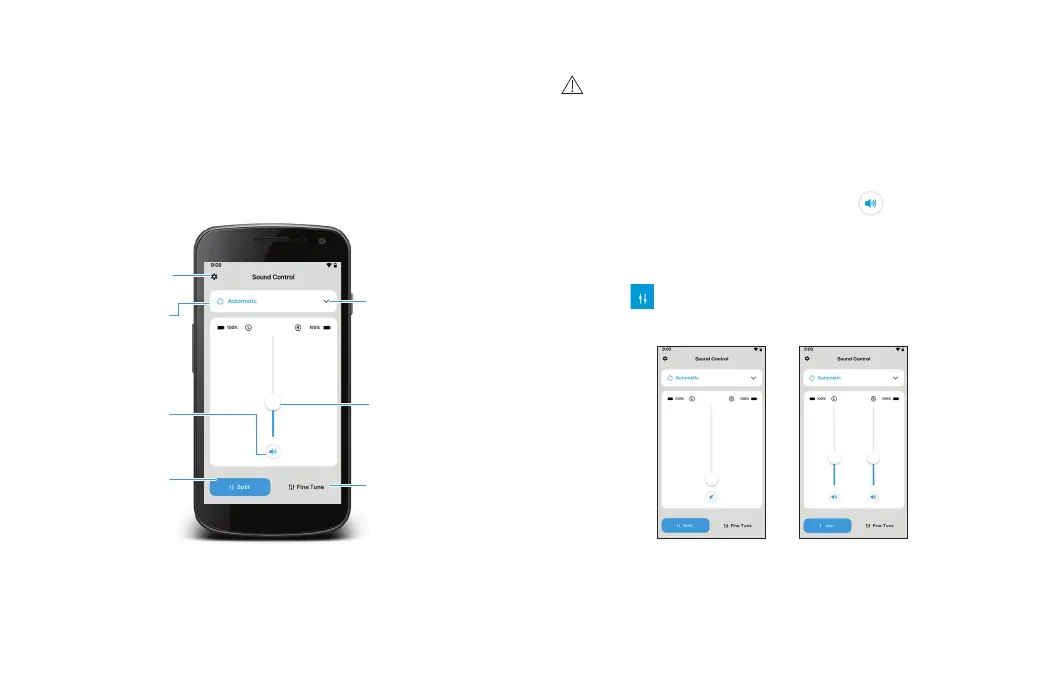
The sound control allows for in-the-moment
control of volume, changing sound modes, and
access to advanced controls such as equalizer and
wind noise reduction.
Sound modes
Settings
Active
sound modes
Mute /
unmute
Split / join
Volume slider
Advanced
controls
Sound control
WARNING: Changing settings, e.g. decreasing
volume may lead to dangers such as incoming
traffic no longer being heard.
Move the slider up or down to adjust your hearing
aid volume on both sides. Tap the icon below
the slider to mute or unmute your hearing aids.
Split the volume
Tap the icon to control the volume on each
hearing aid separately.














 To Next Page