11
Overview of the components
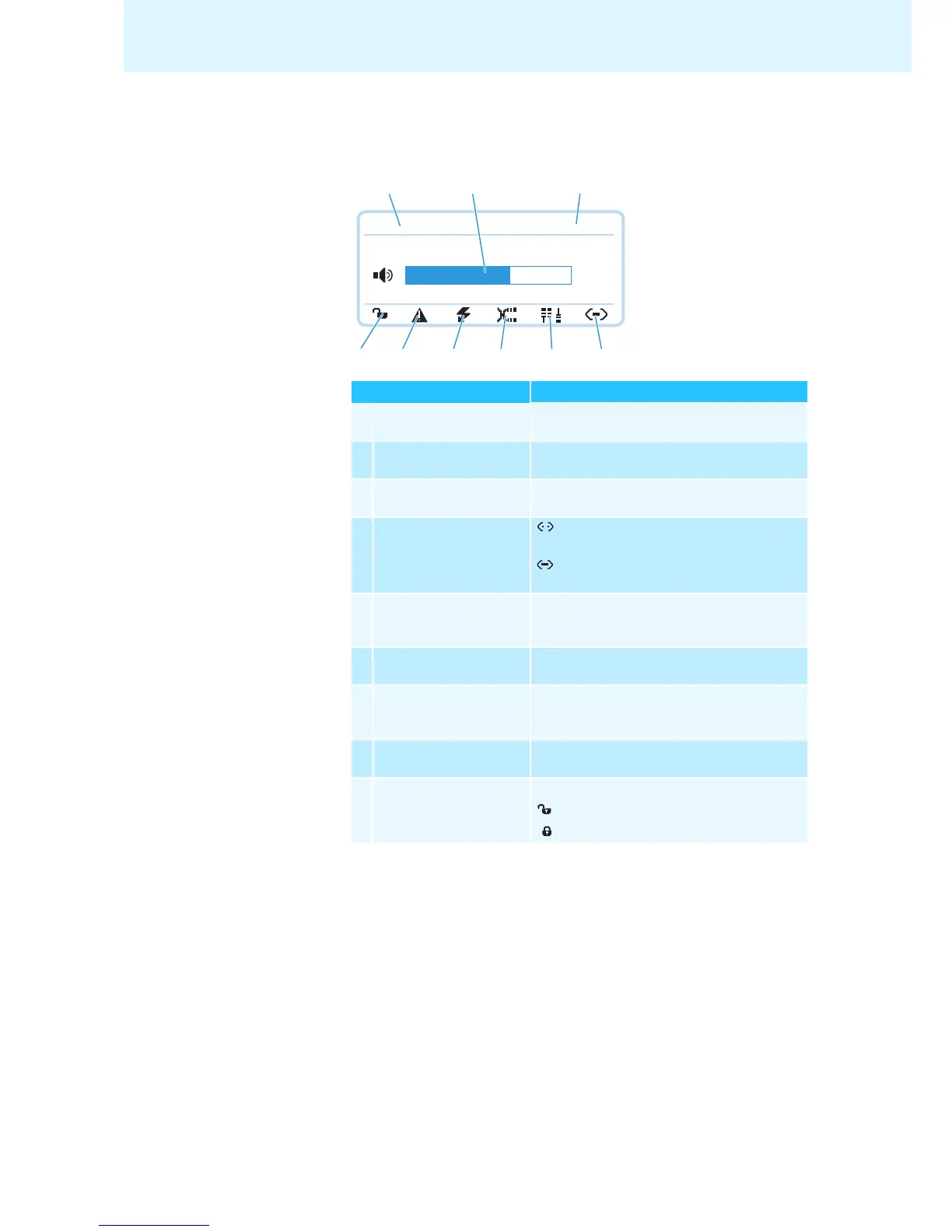
Overview of the ADN CU1 display panel
After switch-on, the central unit’s display shows a progress bar for approx.
30 seconds and then the standard display:
Text/icon Possible display/function
Conference mode Current conference mode:
“Direct Access”, “Override”, “Request
”
Floor channel volume Current volume setting for the conference units’
built-in loudspeakers
Number of
conference units
Number of connected conference units
Connection status : “Conference Manager” software is not
connected to the central unit
: “Conference Manager” software is
connected to the central unit
Structural change icon Icon appears if, since the last initialization, a
malfunction/change has occurred in the wiring
of the conference units (see page 34
)
Cable fault icon Icon appears if conference units are not correctly
connected (see page 34)
Short-circuit icon Icon appears if there is a short circuit in the
wiring of the conference units (see page 34).
The display panel lights up red.
Warning triangle Icon appears if there is a malfunction/change
(see page 34
). The display panel lights up red.
Lock mode icon
(see page 21)
Lock mode of the central unit:
: Lock mode is deactivated
: Lock mode is activated
Direct Access 30 Units
22
G
L
M
N
O
H
I
K
J



 To Next Page