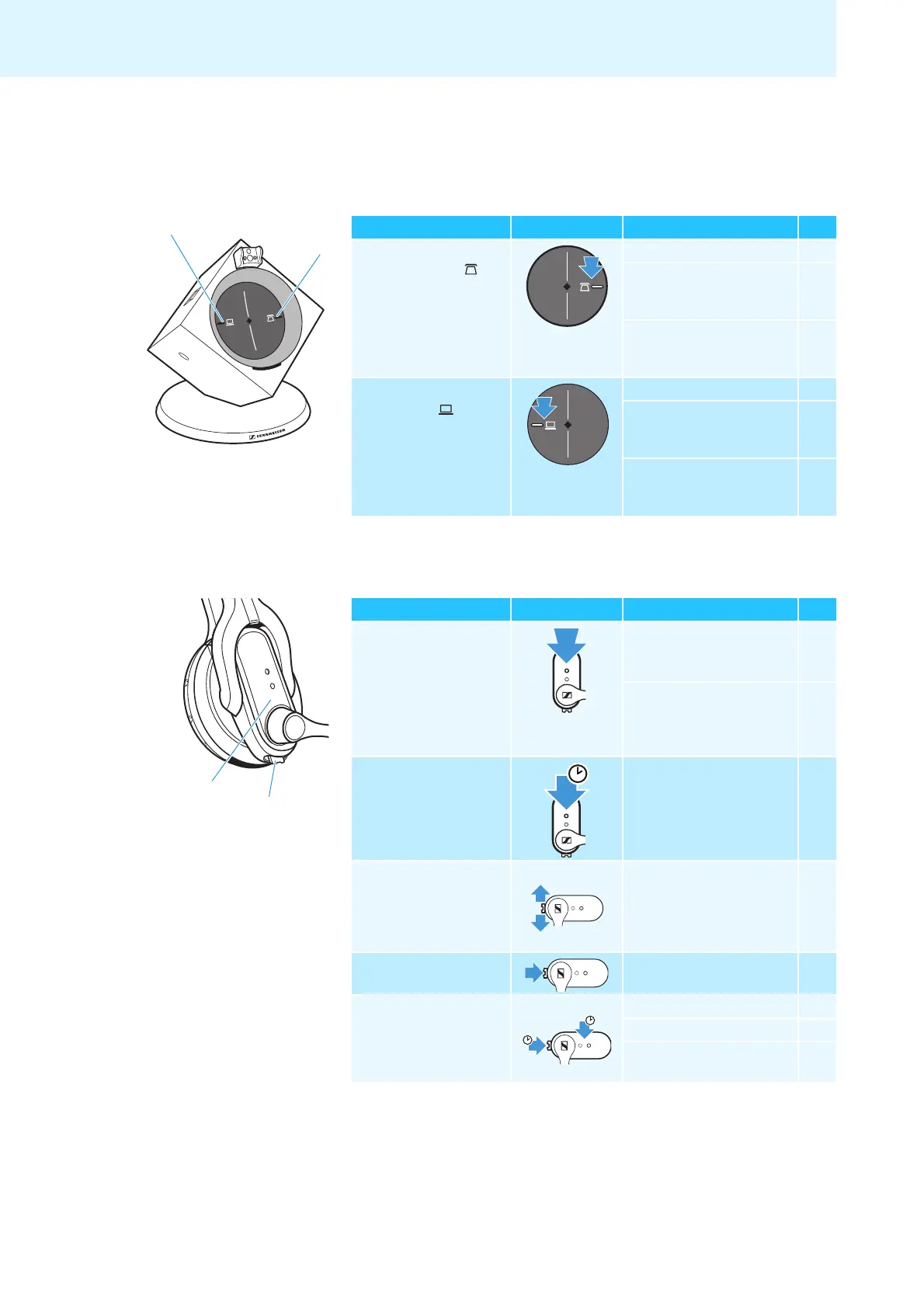
Overview of the buttons
8
Overview of the buttons
Base station
Action Button Functions Page
왘 Press the
PHONE button
쐋
Selects the Phone mode 25
Establishes/disconnects the
link between headset and
base station
23
Accepts/ends a call (with
electronic call control/
handset lifter)
25
왘 Press the
PC button
Selects the PC mode 26
Establishes/disconnects
the
wireless link between
headset and base station
23
Accepts/ends a call
(depending on the
softphone used)
26
Headset
Action Button Functions Page
왘 Press the
LINK button
Establishes/disconnects the
link between headset and
base station
23
Accepts/ends a call (with
electronic call control/
handset lifter or depending
on the softphone used)
25/
26
왘 Press and hold the
LINK button for
5 seconds
5 s
Switches the headset
on/off
23
왘 Push the
AUDIO button
forwards/backwards
Increases/reduces the
ring tone volume, the
volume of the acoustic
signals or the audio volume
by 1 step
29
왘 Press the
AUDIO button
Mutes the microphone/
unmutes the microphone
30
왘 Press and hold the
LINK button and
the AUDIO button
for 5 seconds
Setting mode
GAP pairing mode 31
Swaps the assignment of
the AUDIO button
16



 To Next Page