18 | MB Pro1 | MB Pro 2
Using the headset
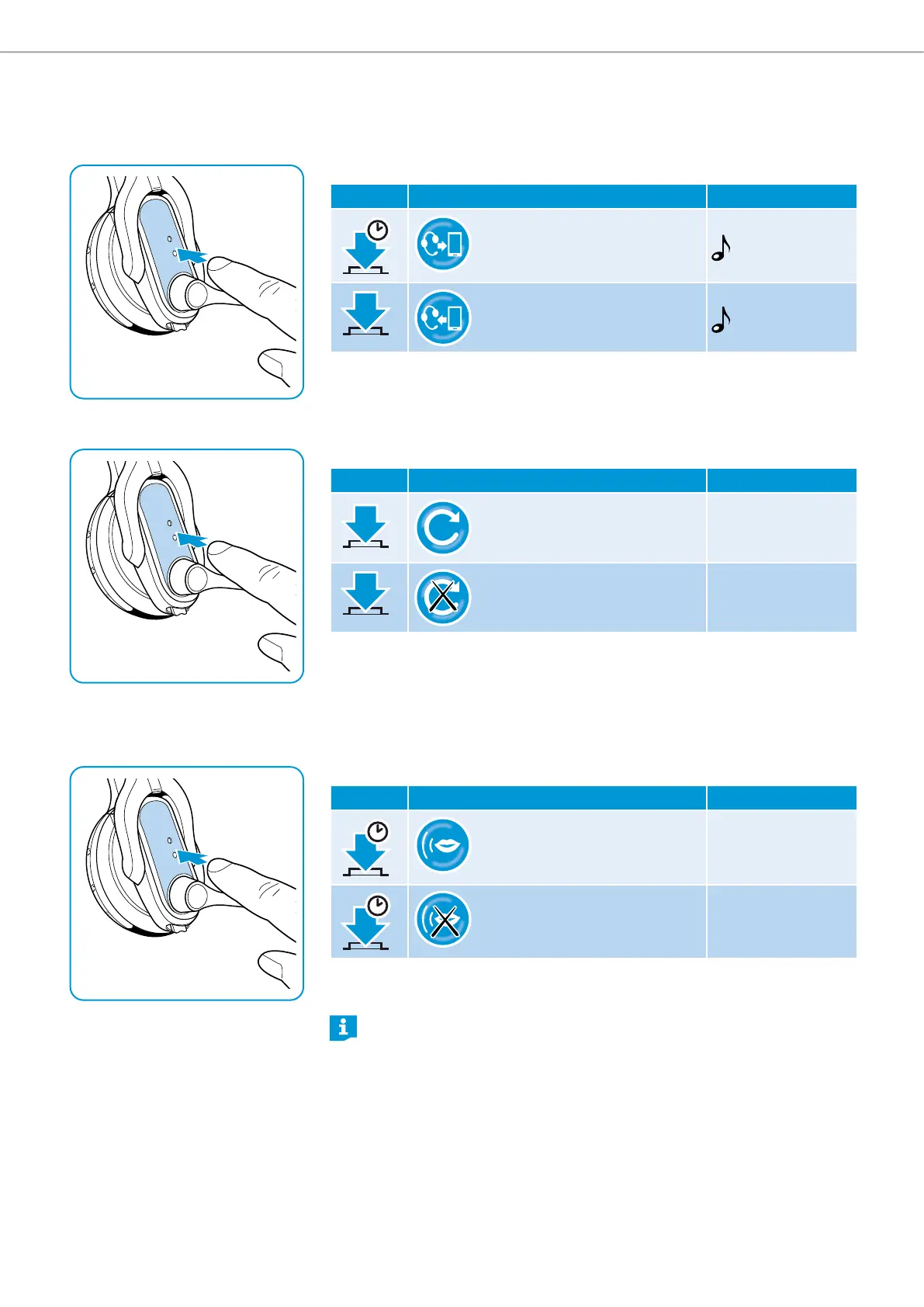
Transfering the call to/from the headset
Once a connection is established, you can transfer the call to/from the headset.
X Press the multi-function button:
Duration Function Beeps
1 s
Transfers a call from the
headset to the mobile phone
Transfers a call from the mobile
phone to the headset
Redialing
The redialing function is only supported by Bluetooth devices with a “hands free
profile” (HFP).
X Press the multi-function button:
Duration Function Voice prompt
2 x
Redials the last number ”Redialing”
Cancels redialing ”Redial cancelled”
Voice dialing
The voice dialing function is only supported by Bluetooth devices with a “hands
free profile” (HFP). The voice commands and functions depend on the Bluetooth
device or on the app. Besides voice dialing, you can dictate SMS messages or
emails (device dependent).
X Press the multi-function button:
Duration Function Voice prompt
1 s
Activates voice dialing ”Voice dial“
1 s
Cancels voice dialing –
X Say your voice command, e.g. “Call Jane”. The Bluetooth device dials Jane’s
number.
Some voice dial systems require an internet connection.




 To Next Page