3. USING MINNOW 2.0
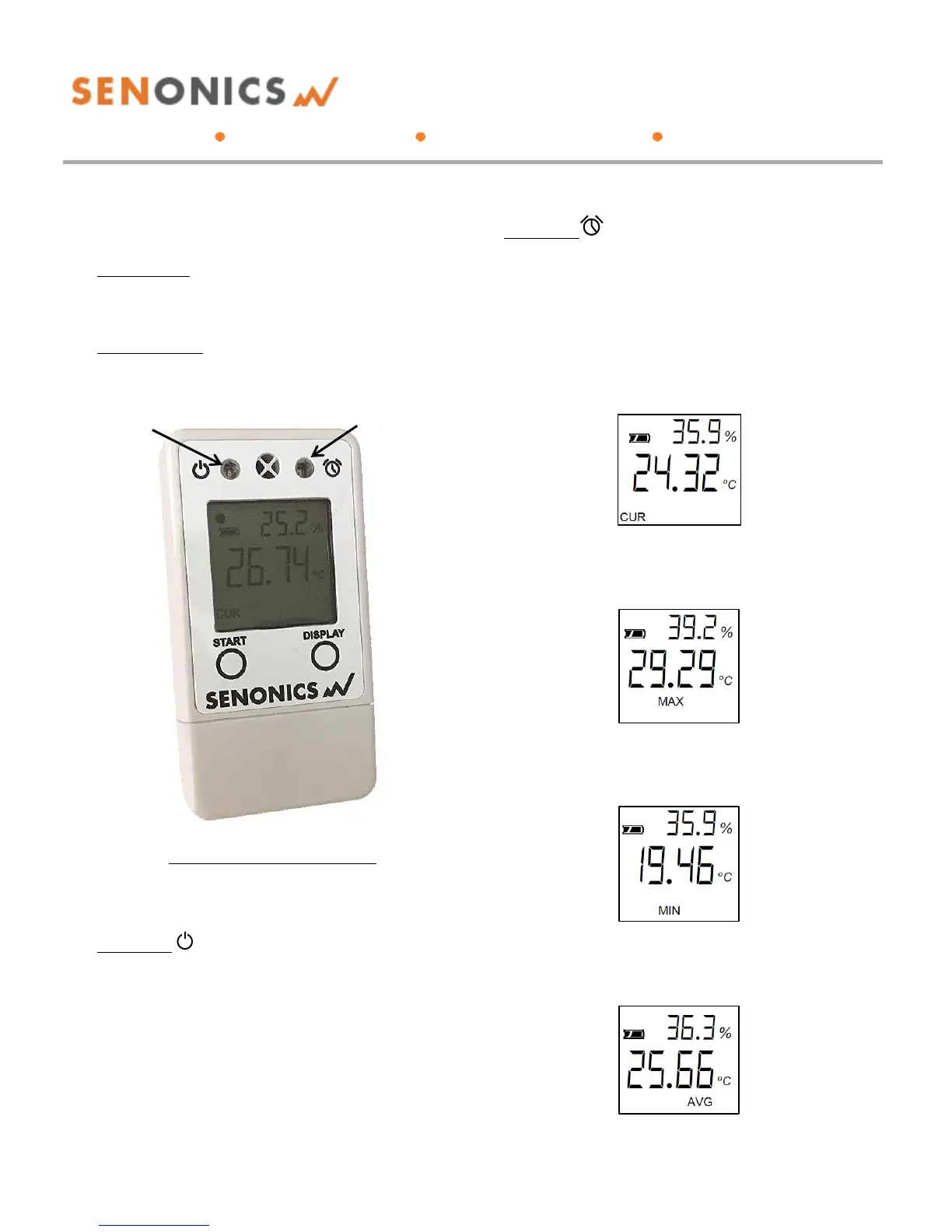
Minnow 2.0 logger includes two buttons:
START button:
When configured for "Button Press" logger start, this
button starts and stops logging. In other
configurations, this button is inactive.
DISPLAY button:
This button allows the user to cycle through all LCD
views.
Figure 2: Buttons, LEDs and LCD
Minnow 2.0 includes two LEDs:
Status LED:
When the logger starts logging then this LED pulses
green once for 1 second.
When logging this LED flashes green for 7
milliseconds and off for 6 seconds.
When the logger stops then this LED pulses red for
1 second then off.
If the logger becomes full this LED flashes red for 7
milliseconds and off for 6 seconds.
Alarm LED:
When a temperature and/or humidity alarm is
triggered this LED flashes red for 7 milliseconds and
off for 6 seconds.
A number of display screens can be stepped through by
pressing the "display" button.
The current screen shows current temperature and
humidity.
A further screen shows the maximum readings during a
logging period.
The third screen shows the minimum readings during a
logging period.
There is also a screen to show the average temperature
and humidity during logging (from last configuration).



 To Next Page