Need help?
Do you have a question about the Sensitech TempTale GEO Eagle and is the answer not in the manual?
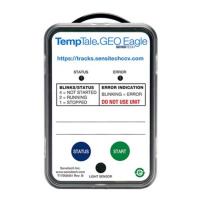
Details the components and indicators on the front of the TempTale GEO Eagle device.
Instructions on how to physically attach the TempTale GEO Eagle monitor to a pallet using sticky pads or tie-wraps.
Guidance on determining the monitor's status and starting its operation, including LED indicators.
 General
| Temperature Range | -30°C to +70°C |
|---|---|
| Data Storage Capacity | 16, 000 readings |
| Location Technology | GPS |
| Resolution | 0.1°C |
| Accuracy | ±0.5°C |
| Temperature Accuracy | ±0.5°C |
| Communication | Cellular |
| Certifications | CE, FCC |

 To Next Page