3
1
3
2
4
5
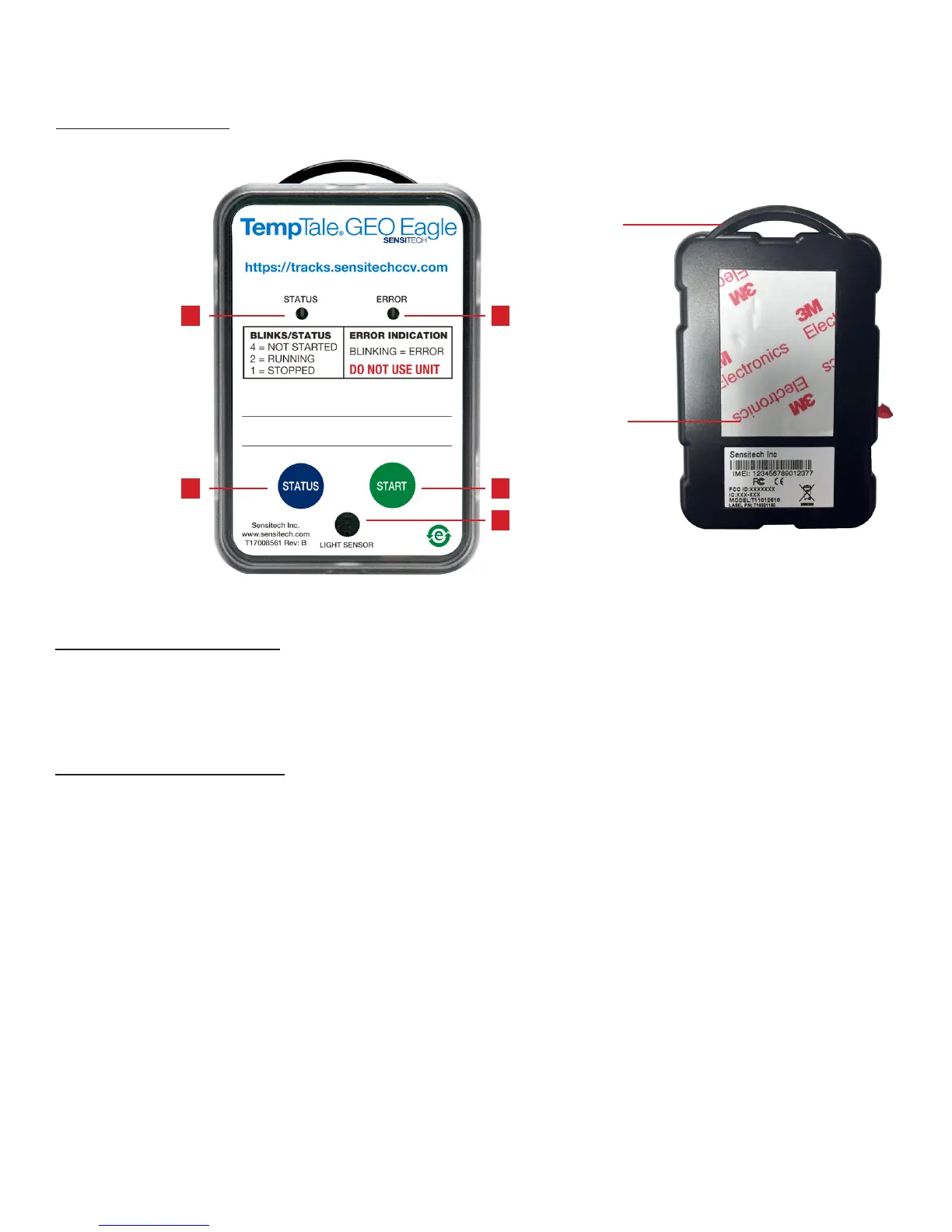
Front of Housing
1. Status LED
2. Error LED
3. Status Button
4. Start Button
5. Light Sensor
TempTale
®
GEO Eagle Instructions for Use
Mounting the Monitor
• The preferred mounting position is to place the device on top of a pallet. To do this, peel off the protector from the
double sided sticky pad and attach the monitor to the mounting surface.
• An alternative mounting method is to use a tie-wrap.
Operating the Monitor
1. Determine monitor status:
• Press the STATUS button briey.
• The STATUS LED will indicate the monitor’s status.
• 4 blinks = NOT STARTED (monitor ready to be started)
• 2 blinks = RUNNING (monitor has already been started)
• 1 blink = STOPPED (monitor has stopped and cannot be started)
• The STATUS button may be pressed multiple times.
2. Starting and using the monitor:
• Press the START button for 1 second.
• The STATUS LED will blink rapidly for 30-60 seconds as the monitor powers up.
• Once the STATUS LED stops blinking the monitor is ready to be placed on a shipment UNLESS THE ERROR LED
STARTS BLINKING RED.
• DO NOT USE THE MONITOR IF THE ERROR LED BLINKS RED.
Tie-wrap
attachment point
Sticky pad


 To Next Page