© Sensortech Systems, Inc. 2014 Page 7 of 15 Rev.5-2014
Mode Selection
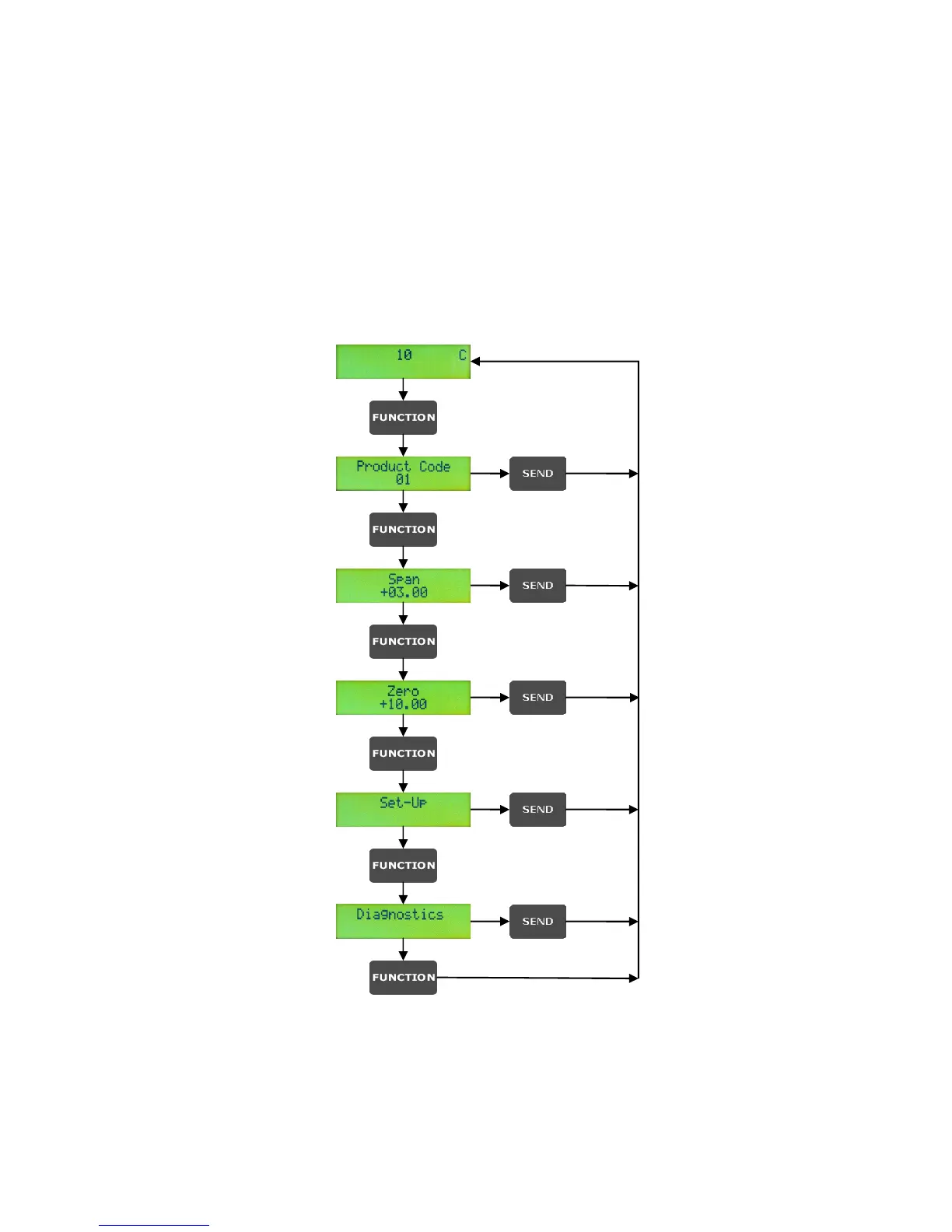
The PMT-330 modes are organized in modules. Each module represents a measurement or configuration
mode e.g. Continuous Measurement mode, Product Code mode, Set-up mode, Diagnostics mode, etc.
At initial power-up, the PMT-330 enters Continuous Measurement mode. Each push of the <FUNCTION>
key advances to the next mode, allowing Product Code selection, Span and Zero entry. The Set-up and
Diagnostics modes are for measurement configuration and calibration. These modes contain multiple
parameters which may be accessed by pressing <ENTER>. Figure 3 illustrates how to step through the
various modes using the <FUNCTION> key. Press <SEND> to return from any mode to Continuous
Measurement mode.
Figure 3. Using FUNCTION & SEND keys to navigate through the Modes


 To Next Page