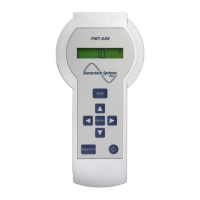
© Sensortech Systems, Inc. 2014 Page 5 of 15 Rev.5-2014
Measurement Modes
Continuous Measurement
This is the default mode when the PMT-330 is powered on. The moisture measurement is continuously
displayed.
Peak Measurement
Pressing the
▲
key while in Continuous Measurement mode places the PMT-330 in Peak Measurement
mode. The display will now hold the highest moisture measurement. To return to the Continuous
Measurement mode, press
▼
key.
Hold Measurement
Pressing the <SEND> key while in Continuous Measurement mode places the PMT-330 in the Hold
Measurement mode. The display will now hold the last moisture measurement. Release the <SEND> key
to return to Continuous Measurement mode.
Parameter Protection / Unlock
All parameters may be displayed, but no changes can be made until a key sequence unlocks
microprocessor memory. To unlock the PMT-330 microprocessor memory, press
▲
and
▼
keys
simultaneously. The display momentarily shows ‘Unlocked’. Except after changing the Product Code, the
PMT-330 microprocessor memory remains unlocked until <Power> is pressed or the PMT-330 time-out
occurs (power off).
The PMT-330 will re-lock microprocessor memory when <SEND> is pressed from the Product Code
screen. This will also save the new product code parameters into microprocessor memory.
Product Codes
The PMT-330 can store product calibrations for ten different product codes. Each product code has its
own associated Span and Zero. To change product codes, unlock the PMT-330 and press the
▲
and
▼
keys to select a new product code. Press <SEND> to save the product code selected to be used for
measurement.
Set-up Mode
Set-up mode parameters are global settings that are pre-set at the factory prior to shipment.
To select the Set-up mode, press <FUNCTION> repeatedly until ‘Set-up’ is displayed.
1. Press <ENTER> to select the Set-up mode. The first parameter is ‘Decimal Places’. Press
▲
and
▼
keys to select ‘0’, ‘1’ or ‘2’ decimal places to be displayed on the measurement.
2. Press <FUNCTION> to advance to the ‘Time Out’ parameter. Press
▲
and
▼
keys to select the
desired time-out period of ‘1’, ‘2’ or ‘3’ minutes. The PMT-330 will power off after this time-out period
to save battery charge.
3. Press <SEND> to save changes to microprocessor memory and return to Continuous Measurement
mode. Press <FUNCTION> to advance to the Diagnostics mode.


 To Next Page
 Loading...